Corporate Data - Ricoh

Extrait du fichier (au format texte) :

CORPORATE DATA

Ricoh Company, Ltd.
Corporate Headquarters

15-5, Minami-Aoyama 1-chome,
Minato-ku, Tokyo 107-8544, Japan
Tel: (81) 3-3479-3111
Fax: (81) 3-3403-1578
Date of Establishment

February 6, 1936

Depositary and Agent for American Depositary Receipts

The Bank of New York
101 Barclay Street, 22 West
New York, NY 10286, U.S.A.
Tel: 212-815-2042
US toll free: 1-888-269-2377
Home Page: http://www.bankofny.com/adr
Listing in the Amsterdam Security Account
System on Amsterdam Stock Exchange

Nominee Amsterdam Stock Exchange
Number of Shares Authorized

1,000,000,000 shares
Number of Shares Issued (as of March 31, 1998)

Depositaries and Agents for Global Bearer Certificates

Deutscher Kassenverein Aktiengesellschaft (DKV)
Commerzbank Aktiengesellschaft

691,546,422 shares
Stock Listings

Tokyo, Osaka, Nagoya, Fukuoka,
Sapporo, Hiroshima, Niigata, Kyoto,
Amsterdam, Frankfurt, Paris

Clearing House and Sponsoring Banks for Listing on
Bourse de Paris

Société Interprofessionnelle pour la Compensation des Valeurs Mobilières (SICOVAM)
Crédit Lyonnais
Nomura France


Les promotions


Regulations Products Made Of Wood
14/03/2025 - www.ricoh.com
Established: February 1, 2010 Revised: April 1, 2021 Scope and requirements of Regulations for Ricoh Group products made of wood 0Purpose0 From the viewpoint of global environmental conservation and biodiversity protection, this provision shall be established to confirm that the wooden raw materials used in Ricoh brand products and their accessories are legally obtained with consideration for the sustainability of the place of origin in environmental and social aspects prior to the decision...

Guide d'installation - Ricoh
28/04/2020 - www.ricoh.com
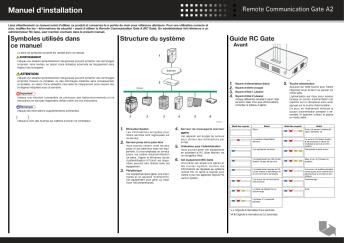
Guide d-installation Lisez attentivement ce manuel avant d-utiliser ce produit et gardez-le sous la main pour vous y reporter ulterieurement. Pour une utilisation sure et correcte, veuillez lire les "Informations de securite" avant d-utiliser la Remote Communication Gate A (RC Gate). Le terme "administrateur" fait generalement reference a l-administrateur de la RC Gate, sauf indication contraire dans ce manuel. Symboles du guide d-installation Les symboles suivants sont utilises dans ce manuel. Important Indique...

198206
198206
11/08/2025 - www.ricoh.com
Since 1936 Company History Coining Office Automation acronym 1936 - 1969 1970 - 1984 1985 - 1999 2000 - 2009 2010 - Present Jun. 1982 Ricoh introduces the RICOPY FT4060, the first dry-toner plain-paper copier The RICOPY FT4060, an A3-page plain-paper copier (PPC) complete with a zoom feature, enjoyed phenomenal market success, with a total of 100,000 units sold in 10 months from its release. Keys to this success were the model's high definition quality, operational durability and compact...

199505
199505
11/08/2025 - www.ricoh.com
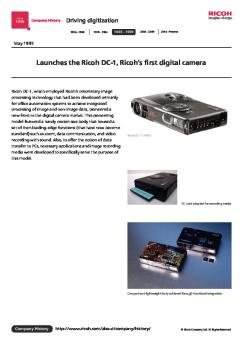
Since 1936 Company History Driving digitization 1936 - 1969 1970 - 1984 1985 - 1999 2000 - 2009 2010 - Present May.1995 Launches the Ricoh DC-1, Ricoh's first digital camera Ricoh DC-1, which employed Ricoh's proprietary image processing technology that had been developed primarily for office automation systems to achieve integrated processing of image and non-image data, pioneered a new front in the digital camera market. This pioneering model featured a handy pocket-size body that housed...

Q4 Report
Q4 Report
25/02/2026 - www.ricoh.com
Note: This document has been translated from the Japanese original for reference purposes only. In the event of any discrepancy between this translated document and the Japanese original, the original shall prevail. May 14, 2025 FLASH REPORT Year ended March 31, 2025 (Results for the Period from April 1, 2024 to March 31, 2025) Performance Outline (Consolidated) (1) Year ended March 31, 2024 and 2025 (Actual result) and Year ending March 31, 2026 (Forecast) Year ended March 31, 2024 Results Domestic...

200810
200810
11/08/2025 - www.ricoh.com
Since 1936 Company History Going global 1936 - 1969 1970 - 1984 1985 - 1999 2000 - 2009 2010 - Present Oct. 2008 Ricoh enters the color Print-On-Demand market and introduces a color production printer, the Ricoh Pro C900 RICOH Pro C900 was launched to pioneer the RICOH Pro series, a new production printer brand. The product was a full-fledged print-on-demand model designed to demonstrate the high-speed, high-productivity capability of achieving 90ppm (A4 landscape) for both color and monochrome...

2015042
2015042
11/08/2025 - www.ricoh.com
Since 1936 Company History Creating New Value 1936 - 1969 1970 - 1984 1985 - 1999 2000 - 2009 2010 - Present Apr. 2015 Ricoh's VCSEL receives the Science and Technology Award Ricoh's 40-channel vertical cavity surface emitting laser (VCSEL) technology was selected for the fiscal 2015 commendation by the Minister of Education, Culture, Sports, Science and Technology, and two development leaders-Shunichi Sato, chief engineer at Ricoh Future Technology Laboratory (FTL), and Naoto Jikutani, researcher...

20241225 J
20241225 J
12/03/2025 - www.ricoh.com
Oy>hHQ? 2025 0?0?0?0?0?0?0?0? 0?0?0?0?0?0? 0?0?0?0?0?0?0o00?0?0?0?0?0?0?0ne?00nR$e?0?m;R?0nW?y0h0j0?fn?Mv?0jt_?0g0Y0 P N?0nP?0M0L0D0h0Oim0nb?w0?N!z?0U0[0?0S0h0o0c }?SN??0j}Ln0]0W0fy>O0nvzU0k_??N SNk 0g0Y0 0S0?0~0g0nN?imm;R?0g0^80k0J[?i?0n 0o0_0?0O 0k[?0? m?0c0f0M0_y?0_0a0o00 0o0_0?0O 0kkS0s0?0 0?0?0?0?0?0? 0?0n0 OT}0h/lc0YY?0 0kc?0R0f0D0~0Y0 0?0?0?0?0?0?0?0L0J[?i?0kc?O?0Y0?O?Po00?0?0n0?0n R?0g00o0_0?0ON?0hN?0?00]0W0f0N0?0?0?0?0?0?0h0N0?0?0? 0?0?0?0?0d0j0P0S0h00]0n0S0h0g0N0?0?0?0?0?QhOS0?Y ?i 0Y0?0S0h0g0Y0 0J[?i?c?p?0?Y'R0k0Y0?0?0?0?0?0W0D0?0?0n0?0?0?0?0? 0g00o0_0?0ON?0nRu?...


Gu?de inicio (PDF) - Logitech
05/12/2014 - www.logitech.com
1 Getting started with Première utilisation Logitech® Gaming Mouse G500 Español Configuración del mouse.  Plug mouse USB cable into your computer s USB port. The G500 is ready to go, and is fully optimized for game play. Conecta el cable USB del mouse al puerto USB  de la computadora. G500 está listo para usar y optimizado para el juego. Français Installation de la souris. Português Instalação do mouse. B  ranchez le câble USB sur le port USB de l ordinateur. La souris G500...

User's Guide - Support - Apple
27/11/2014 - manuals.info.apple.com
Macintosh Performa User s Guide Includes setup, troubleshooting, and health-related information for Macintosh Performa 640 series DOS Compatible computers K Apple Computer, Inc. © 1995 Apple Computer, Inc. All rights reserved. Under the copyright laws, this manual may not be copied, in whole or in part, without the written consent of Apple. Your rights to the software are governed by the accompanying software license agreement. The Apple logo is a trademark of Apple Computer, Inc., registered...

Power Mac G5 Memory Replacement Instructions ... - Apple
27/11/2014 - manuals.info.apple.com
øÿ Power Mac G5 Memory Replacement Instructions Follow the instructions in this sheet carefully. Failure to follow these instructions could damage your equipment and void its warranty. Note: Online instructions are available at http://www.info.apple.com/installparts/. Tools Required No tools are required for this procedure. About Power Mac G5 Memory Power Mac G5 (Late 2004) computers have four Dual Inline Memory Module (DIMM) slots. Each slot accepts 400 Mhz Double-Data-Rate (DDR) Synchronous...

MacBook Pro (Retina, 13-inch, Mid 2014) - Support - Apple
27/11/2014 - manuals.info.apple.com
Welcome to your new MacBook Pro. Let us show you around. This guide shows you what s on your Mac, helps you set it up, and gets you up and running with tips for the apps you ll use every day. Hello. SDXC Transfer photos from your camera s memory card Your battery is charged and ready to go, so you can start using your Mac right out of the box. When you do recharge the battery, you ll know it s fully charged when the orange light on your power connector turns green. MagSafe 2 Magnetically...

PRODUCT DESCRIPTION SHEET
20/03/2015 - docs.whirlpool.eu
AKZ 531 DE AT BE GB FR NL GR PRODUCT DESCRIPTION SHEET RU 1. 2. Highest level 3. 4. 5. 6. 7. 8. First level Control panel Cooling fan (not visible) Fan operation switches on only when the oven and/or hob have reached a certain temperature, and may continue even after the appliance has been turned off, for a few minutes. Top heating element (can be lowered) Oven light Fan Circular heating element Bottom heating element (not visible) Oven cool door Oven functions table Function

C930e Datasheet
C930e Datasheet
26/03/2025 - www.logitech.com
epcn?h C930c UFu(Q~?dDP?Y4 ???z3[?0 X?_:SOO Q?P H.264 e/c0[-^v?[??? ~n???? C930c SNc?O?NN~??? ?(T?u;?(? ?? c??V??]?OeH s?0 [-^v? 90? [???~n???SNW([??v?u;hFN-Q??rW0Uy:N*N?u(b7S?QvR?Ql zz??? ? NN$N*??b_QhT??QK??SNnfpb?S???N|sv?X???0 1080p u;?(N v? 4 P S?q&T? H.264 ???S?)s?SNxnO????zuE? NTHs? f?N0[?v?~??0 C930c ]???? Microsoft Teams?0?~??O??0????O??T? Skype!" for Business ????? Q|[?QvN?N;mA^?u(z ^?? Sb? BlueJeans0Cisco Webex!"0Fuze0GoToMeeting?0Lifesize Cloud0Microsoft DirectShow0Pexip0RingCentral...