Operating Instructions - Ricoh

Extrait du fichier (au format texte) :

Manuel d'installation
Lisez attentivement ce manuel avant d'utiliser ce produit et conservez-le à portée de main pour référence ultérieure. Pour une utilisation correcte et sûre, veuillez lire les « Informations de sécurité » avant d'utiliser la Remote Communication Gate A (RC Gate). Un administrateur fait référence à un administrateur RC Gate, sauf mention contraire dans le présent manuel.

Symboles utilisés dans ce manuel

Structure du système

La série de symboles suivante est utilisée dans ce manuel.

Guide RC Gate
Avant

1 2 3 4

1

Indique une situation potentiellement dangereuse pouvant entraîner des dommages corporels, voire mortels, en raison d'une utilisation incorrecte de l'équipement sans respect des consignes.

Internet

Indique une situation potentiellement dangereuse pouvant entraîner des dommages corporels mineurs ou modérés, ou des dommages matériels sans conséquences corporelles, en raison d'une utilisation incorrecte de l'équipement sans respect des consignes indiquées sous ce symbole.

DJH100

2

1.
2.
3.
4.

TCP/IP

Indique une situation susceptible de provoquer des dysfonctionnements si les instructions ne sont pas respectées. Veillez à bien lire ces instructions.

Voyant d'alimentation (bleu)
Voyant d'alerte (rouge)
Voyant d'état 1 (Jaune)
Voyant d'état 2 (Jaune)
Indique différentes situations selon l'état de la RC Gate. Pour plus d'informations,


Les promotions


197511
197511
11/08/2025 - www.ricoh.com
Since 1936 Company History Coining Office Automation acronym 1936 - 1969 1970 - 1984 1985 - 1999 2000 - 2009 2010 - Present Nov. 1975 Ricoh becomes the first recipient of the Deming Prize in the office automation industry In November 1971, Ricoh introduced a total quality control (TQC) campaign, aiming to build a recession-proof robust corporate structure. We began to conduct various TQC activities throughout the company to improve its management systems, setting as the goal the winning...

198604
198604
11/08/2025 - www.ricoh.com
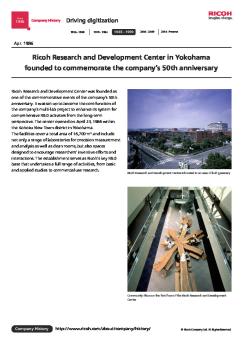
Since 1936 Company History Driving digitization 1936 - 1969 1970 - 1984 1985 - 1999 2000 - 2009 2010 - Present Apr. 1986 Ricoh Research and Development Center in Yokohama founded to commemorate the company's 50th anniversary Ricoh Research and Development Center was founded as one of the commemorative events of the company's 50th anniversary. It was set up to become the core function of the company's multi-lab project to enhance its system for comprehensive R&D activities from the long-term perspective....

196211
196211
11/08/2025 - www.ricoh.com
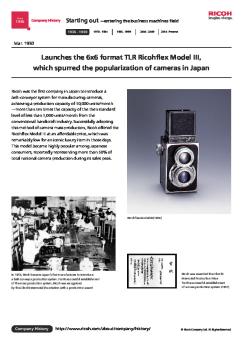
Since 1936 Company History Starting out entering the business machines field 1936 - 1969 1970 - 1984 1985 - 1999 2000 - 2009 2010 - Present Nov. 1962 Introduces the Ricoh Auto Half, a half frame camera that proves to be a massive hit Ricoh is a leading pioneer in the field of automatic camera technologies. In 1960 it released Ricoh Auto 35, the first electric-eye camera developed by a Japanese company; and then in 1962, rolled out the more advanced and handy Ricoh Auto Half a half-frame, fully...

197104
197104
11/08/2025 - www.ricoh.com
Since 1936 Company History Coining Office Automation acronym 1936 - 1969 1970 - 1984 1985 - 1999 2000 - 2009 2010 - Present Apr. 1971 Ricoh introduces the RICOM 8, its first office computer Ricoh was a pioneer in the field of office computer development that saw rapid growth in Japan in the 1970s. This is illustrated by the 1971 introduction of the RICOM 8, the company's first office computer, which was developed jointly with TDK. The embedded magnetic core memory with a 2/4 kilobyte capacity and...

201110
201110
11/08/2025 - www.ricoh.com
Since 1936 Company History Creating New Value 1936 - 1969 1970 - 1984 1985 - 1999 2000 - 2009 2010 - Present Oct. 2011 Establishes PENTAX RICOH IMAGING COMPANY, LTD.* PENTAX Ricoh Imaging Company, Ltd. was established to become a wholly owned subsidiary of Ricoh, effective on October 1 , 2011. Through this move, the firm rebuilt its offerings based on the PENTAX brand lineup of DSLRs coming with a broad lens selection, adding to it Ricoh's existing digital camera range, with a greater...

WEEE Treatment Information for Custmers - Ricoh
07/12/2016 - www.ricoh.com
Informations à l'attention des utilisateurs de matériel électrique et électronique Utilisateurs se trouvant dans les pays pour lesquels le symbole indiqué dans la présente section a été spécifié dans la législation nationale sur la collecte et le traitement des déchets électroniques Nos produits contiennent des composants haute qualité conçus pour en faciliter le recyclage. Le symbole ci-après est apposé sur nos produits ou leurs emballages. Le symbole indique que le produit ne...

2014092
2014092
11/08/2025 - www.ricoh.com
Since 1936 Company History Creating New Value 1936 - 1969 1970 - 1984 1985 - 1999 2000 - 2009 2010 - Present Sep. 2014 Launches the additive manufacturing (AM) business Ricoh's additive manufacturing (AM) business, which the Company launched, is centered on 3D printers. The initial project in this business was to open RICOH Rapid Fab, a base for offering manufacturing innovation solutions. It is a frontline base for the 3D printers business, tasked with procurement and marketing, output...

199608
199608
19/08/2025 - www.ricoh.com
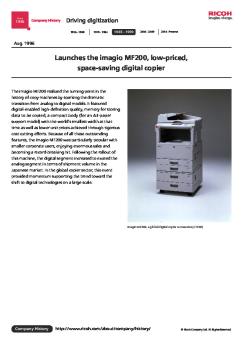
Since 1936 Company History Driving digitization 1936 - 1969 1970 - 1984 1985 - 1999 2000 - 2009 2010 - Present Aug. 1996 Launches the imagio MF200, low-priced, space-saving digital copier The imagio MF200 realized the turning point in the history of copy machines by sparking the dramatic transition from analog to digital models. It featured digital-enabled high-definition quality, memory for storing data to be copied, a compact body (for an A3-paper support model) with the world's smallest...


VR-360/D-760 VR-350/D-755 VR-340/D-750 - Olympus America
07/09/2018 - www.olympus.fr
APPAREIL PHOTO NUMÉRIQUE VR-360/D-760 VR-350/D-755 VR-340/D-750 Manuel d instructions %Ï Nous vous remercions d avoir acheté un appareil photo numérique Olympus. Avant de commencer à utiliser votre nouvel appareil photo, veuillez lire attentivement ces instructions afin d optimiser ses performances et sa durée de vie. Conservez ce manuel dans un endroit sûr pour pouvoir vous y référer ultérieurement. %Ï Nous vous recommandons de prendre des photos-test pour vous habituer à votre...

Stereo C 2410e
Stereo C 2410e
22/06/2024 - www.accuphase.com
Review in STEREO magazine (Germany), Issue 10/2007 Preamplifier Accuphase C-2410 Shadow-Boxing ? by Matthias Böde Accuphase has gone over the - in our opinion "superman-preamplifier" C-2400 and launched it again as C-2410. We were of course more than inclined to compare the new one with its predecessor, but we were also wondering if this might eventually become a dead-end race - or is the newcomer indeed the better preamplifier? In view of the C-2400's price tag it would seem a bit strange to...

Compacité Connectivités - Brother
25/07/2017 - www.brother.fr
DCP-J562DW Compacité Connectivités at your side = à vos côtés Imprimante multifonction jet d encre 3-en-1 DCP-J562DW Le DCP-J562DW permet d imprimer, copier et numériser dans une imprimante multifonction compacte, incorporant le recto-verso et des fonctionnalités avancées d utilisation : Wiû Connectez-vous facilement et partagez l imprimante à plusieurs grâce à la connexion sans ûl Mobile Utiliser l app iPrint&Scan, Apple AirPrint ou encore Google Cloud Print!" pour imprimer...

L'ouverture de l'objectif s'arrête instantanément sur la position ...
06/03/2012 - www.pentax.fr
COMMENT UTILISER LA FONCTION HyM (HYPER MANUELLE) LORSQUE LA BAGUE DE DIAPHRAGME EST CONFIGUREE SUR UNE POSITION AUTRE QUE "A". 1. Choisir dans le menu personnalisé la fonction [ARRET F objectif différent de A] en position [Oui] pour permettre le déclenchement, 2. Choisir M sur la molette de sélection. 3. Sélectionner l'ouverture de l'objectif selon la valeur désirée. 4. Presser le Bouton Vert. *L'ouverture de l'objectif s'arrête instantanément sur la position définie en 3 5. Déclencher...

Robot / Pétrin Multifonctions Robot / Mixer Multifunktions ... - H.Koenig
05/01/2017 - www.hkoenig.com
Robot / Pétrin Multifonctions Robot / Mixer Multifunktions Robot / Keukenmachine Multifunctioneel Robot / BatidoraMultifunción Robot Impastatrice Multifunzione KM-60s Manuel d'Utilisation Benutzerhandbuch Gebruiksaanwijzing Manual de Usuario Manuale d uso FRANCAIS Données techniques Modèle : KM60s Tension nominale : 220-240V, 50/60Hz Puissance maximale : 1000W Classe de protection : II Afin de prolonger la durée de vie de l appareil, nous vous conseillons des utilisations par tranches...

1 Setting Up Your Monitor - Support - Apple
27/11/2014 - manuals.info.apple.com
1 Setting Up Your Monitor The AppleVision 850 and AppleVision 850AV are two-page, Trinitron® color monitors with a diagonal viewable image size of 19.0 inches. Both monitors support a variety of resolutions and feature advanced controls for accurate color rendering. The monitors work with Mac OS based and Windows-based computers. The AppleVision 850AV includes an integrated audio system consisting of built-in speakers and microphone. This chapter reviews important safety information and explains...