Quick Start Guide - Sony UK

Extrait du fichier (au format texte) :

3-268-741-21 (1)

Customer Support Portal
If you have any questions or for the latest support information on navigation, visit the website below:

http://www.navu.sony-europe.com/support

Quick Start Guide

Anleitung zur schnellen
Inbetriebnahme

Tragen Sie danach die Seriennummer (SERIAL NO.) in dem reservierten Feld ein. Sie finden diese auf einem
Aufkleber, der auf dem Gerätegehäuse angebracht ist.
Nehmen Sie den ausgefüllten Geräte-Pass anschließend unbedingt aus der Bedienungsanleitung heraus, falls Sie diese im Fahrzeug aufbewahren möchten. Bitte bewahren Sie den Geräte-Pass an einem sicheren Ort auf. Er kann im Falle eines
Diebstahls zur ldentifikation lhres Eigentums dienen.

Personal Navigation System

Bitte kreuzen Sie zunächst die genaue
Modellbezeichnung in dem dafür vorgesehenen Feld an.

GB

DE

Personal Navigation System

Quick Start Guide

How to use this manual

Uso del presente manuale

When reading this manual, keep the control layout illustration (on the rear of this page) open for quick reference from any page.

Durante la lettura del manuale, utilizzare le illustrazioni sul retro di questa pagina come riferimento rapido.

Hinweis zu dieser

Les promotions

Promo
14.9 € 12.9 €


Fiche produit Sony : 69/1237480397469.pdf
16/02/2012 - www.sony.fr
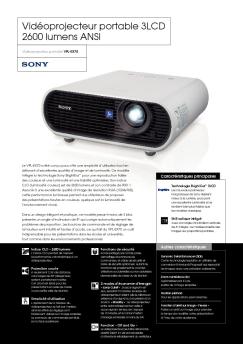
Vidéoprojecteur Home Cinema 3D Full HD Vidéoprojecteur Home Cinema 3D VPL-VW90ES Proposant une superbe image 3D et les dernières innovations technologiques Sony dans le domaine du Home Cinema, le VPL-VW90ES est un vidéoprojecteur 3D Full HD destiné à assouvir la passion des cinéphiles. Basé sur la technologie de panneaux SXRD de qualité cinématographique, le VPL-VW90ES procure tout ce qu'un connaisseur de 3D est en droit d'exiger : une image 3D précise, profonde, lumineuse et sans cross...

Issue 06: Tips for Reproducing Solid Picture Edges - Sony
16/02/2012 - www.sony.fr
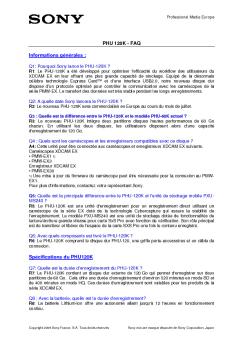
Camera Settings To adjust KNEE APERTURE, use the DETAIL 2 page of the PAINT menu. Issue 06 DETAIL 2 of the PAINT 1 Open menu. 00 CONTENTS Tips for Reproducing Solid Picture Edges of an Image s Highlights nal. The Before setting  image demonstrates how the KNEE function eliminates highlight washed-outs,  but also shows that the picture edges of bright objects such as the flower petals and plastic cubes get blurred. In such situations, the picture edges of the highlight areas can be reproduced...

Fiche produit Sony : 72/1196773880272.pdf
16/02/2012 - www.sony.fr
Octubre de 2007 Sony incorpora la tecnología Bluetooth y amplía su gama de premiados navegadores portátiles panorámicos · La nueva tecnología Bluetooth permite realizar llamadas con manos libres desde el coche · Los nuevos modelos de la gama, con un diseño unificado, satisfacen necesidades muy diversas · La pantalla panorámica ofrece una mayor seguridad y comodidad y asegura la visión total y completa de la carretera Sony presenta su nueva gama de dispositivos de navegación personal....

Communiqué de presse - Sony
17/11/2014 - www.sony.fr
Communiqué de presse Paris, le 14 août 2008 Nouveau meuble télé intégré RHT-G500 : Une solution élégante et stylée à votre mesure " Système surround totalement intégré conçu pour les téléviseurs BRAVIA 26 à 32 pouces " S-Force PRO Front Surround pour une acoustique exceptionnelle sans haut-parleurs arrière " Technologie BRAVIA Sync " Connexions HDMI compatibles avec les tout derniers formats de télévision Haute Définition Avec les produits « Home Cinema invisibles...

Fiche produit Sony : 53/1225983676753.pdf
16/02/2012 - www.sony.fr
· · · · · · 7 ! . ' ' ! () / 0! ) 4 2 5 $ 4 ! * " # $& % ' +, 3& - 1 2 $- ' ! 6 - *** ! # $ $ $ % && % $ " ' $ $ $ $( ) " * % % / 01 " * $ &+ " . ,- -/ $ *3 " 4 * & 02 / $ / 0 ( 4 = > 9 : * $ / =" @ $ ! 56 3 * 7 / 8 " ; / 9 : < > . # ' A /" =# > ; $ ? > 4 = * % % B && & ? + '< @ $ &0 + + $ $ / C D 2 B ., * " $ &+ " . ,' 3 $ * " B / B. 6 ' $ /

ELC-MVS01 Brochure (1.0 MB) - Sony
16/02/2012 - www.sony.fr
ELC-MVS01 "Enhanced Live-production Control System" Multi-format control-room automation software Enhanced Live-production Control System The MVS series of multi-format production switchers has gained worldwide acceptance, since its inception in 2001, helping to establish Sony as a leader in the live production market. Sony has continuously evolved the MVS platform with hardware and software that combine high performance and ease of use with the technology's scalable architecture. The latest development...

Issue 02: Tips for Reproducing Vivid Colors Under - Sony
16/02/2012 - www.sony.fr
Camera Settings To adjust KNEE SATURATION, use the KNEE page of the PAINT menu. Issue 02 Tips for Reproducing Vivid Colors Under a Bright Environment Preface When shooting a bouquet using a spotlight, the bright areas of the image can be overexposed and washed out  on the screen. This phenomenon can be eliminated using the camera s KNEE function, keeping the image s brightness (luminance) of objects within the video signal s dynamic range (the range of the luminance that can be processed). However,...

Fiche produit Sony : 40/1166605183240.pdf
16/02/2012 - www.sony.fr
Camera Settings To adjust BLACK GAMMA, use the BLACK GAMMA page of the PAINT menu. Issue 04 BLACK GAMMA of the 1 Open PAINT menu. 00 CONTENTS Tips for Enriching Color Saturation in Dark Areas of an Image TOP 01.SW STATUS 02.WHITE 03.BLACK/FLARE 04.GAMMA 05.BLACK GAMMA 06.KNEE 07.DETAIL 1 08.DETAIL 2 09.DETAIL 3 10.SKIN DETAIL Preface When shooting a documentary, for example, the color saturation in the dark areas of the picture may sometimes not be properly reproduced. As shown in the Before...


Msft Surfacelaptopintel Ecoprofile
02/10/2025 - www.microsoft.com
ECOPROFILE Surface Laptop 13.8" 7th Edition for Business (Intel) Surface Laptop 13.8" 7th Edition for Business (Intel) Ecoprofile ? Microsoft Corporation. All rights reserved. Last updated February 2025 Our goals In 2020 Microsoft committed to becoming carbon negative, water positive, and zero waste by 20301. Surface plays a key role in helping Microsoft achieve these goals, so we are working to reduce the environmental impacts of our Surface products. Our approach embeds sustainability into...

Návod pre Whirlpool AWE 89611
20/03/2015 - docs.whirlpool.eu
IFU-TL HR SK.fm Page 1 Friday, November 7, 2008 2:38 PM OBSAH NÁVOD NA OBSLUHU PRED PRVÝM POU}ITÍM SPOTREBI A BEZPE NOSd PRI PRÁCI A V`EOBECNÉ RADY POPIS PRÁ KY PRED PRVÝM CYKLOM PRANIA PRÍPRAVA CYKLU PRANIA PRACÍ PROSTRIEDOK A AVIVÁ}NE PROSTRIEDKY  ISTENIE FILTRA/ VYPUSTENIE ZVY`KOVEJ VODY STAROSTLIVOSd A ÚDR}BA PRÍRU KA NA ODSTRAGOVANIE PROBLÉMOV SERVIS PREPRAVA A MANIPULÁCIA SO SPOTREBI OM IN`TALÁCIA Black process 45.0° 100.0 LPI IFU-TL HR SK.fm Page 2 Friday,...

ENERGY LABEL
ENERGY LABEL
20/03/2015 - docs.whirlpool.eu
WHIRLPOOL AWOD 4944 A A A A A A A 215 kg 10800 2010/1061 9 59 dB ABCDEFG 79 dB

mode d'emploi du game boy player - Nintendo
12/10/2017 - www.nintendo.com
BESOIN D AIDE POUR L INSTALLATION OU L ENTRETIEN ? VOUS VOULEZ COMMANDER DES PIÈCES OU DES ACCESSOIRES ? MC MODE D EMPLOI DU GAME BOY PLAYER SERVICE À LA CLIENTÈLE : WWW.NINTENDO.CA ou appelez le 1 (800) 255-3700 Du LUN. au DIM., de 6h00 à 19h00; heure du Pacifique. (Heures sujettes à changement) Service ATS à la clientèle : (800) 422-4281 BESOIN D AIDE POUR JOUER ? Vous pouvez visiter notre site web à www.nintendo.ca pour obtenir de l aide. Pour contacter la ligne informatisée d'indices...

Tap
Tap
11/05/2025 - www.logitech.com
POUR DES R?UNIONS DE MEILLEURE QUALIT? EN UN CLIC Logitech Tap L'?cran tactile Logitech ? Tap se connecte ? tout type d'ordinateur via USB, conf?rant ainsi de nouvelles possibilit?s de collaboration en ?quipe, l'automatisation de la pi?ce , le contr?le de l'environnement et l'affichage dynamique. Contrairement aux ?crans AV qui requi?rent une int?gration et une installation complexes, Logitech Tap offre une connectivit? pr?te ? l'emploi sous forme d'?cran suppl?mentaire. Elle permet aux d?veloppeurs...

Manuel d'utilisation Bedienungsanleitung Manual de Instrucciones ...
03/04/2012 - www.vtech-jouets.com
FR DE SP NL Manuel d'utilisation Bedienungsanleitung Manual de Instrucciones Handleiding © 2011 VTech Imprimé en Chine Impreso en China In China gedruckt Printed in China 91-009628-001-000 FR Chers parents, Chez VTech®, nous sommes conscients que les enfants sont notre avenir. C'est pourquoi tous nos jeux sont conçus de manière à entretenir et à renforcer leur désir d'apprendre. Tout le savoir-faire et le sens de la pédagogie VTech® sont mis au service de l'enfant pour le familiariser...