Supercharge Your School It Team

Extrait du fichier (au format texte) :

Supercharge
Your School's IT Team
Give busy IT teams a boost with time-saving edtech

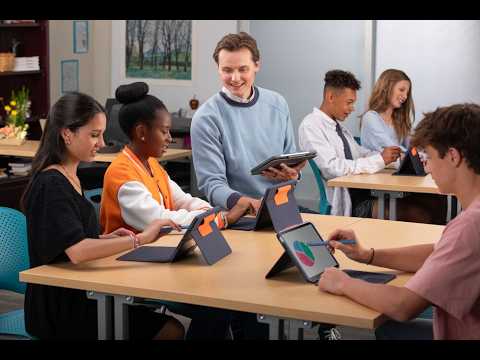
The challenges school IT staff face require innovative product designs and a deep understanding of school needs. From organizing inventory to equipping staff,
educators and students with reliable tech, Logitech can help tech experts ensure the school year is a success with tools that make their days less hectic.

STREAMLINE INVENTORY AND SIMPLIFY MANAGEMENT
Logitech offers easy-to-clean, plug-and-play products designed for durability and increased value by reducing replacement needs. Our rugged, school-friendly solutions feature packaging designed to help IT administrators quickly deploy and easily track inventory.

RUGGED COMBO
KEYBOARD CASE

ZONE LEARN WIRED
HEADSET

920-009320
(Rugged Combo 3)

981-001372
(3.5 mm AUX, On-ear)

920-010341
(Rugged Combo 3 Touch)

981-001389
(3.5 mm AUX, Over-ear)

920-011133
(Rugged Combo 4)

981-001367 (USB-C, On-ear)

920-011130
(Rugged Combo 4)

With audio drivers tuned for vocal clarity and optimized for digital learning applications, Zone Learn enables sustained focus and clarity.
Headsets are packaged in individual storage bags with space to write students' names for easy tracking.

Protect student iPad$? devices and enable more productivity. Rugged

Les promotions


Detailed Information - Logitech
05/12/2014 - www.logitech.com
2. Organizational Structure 2.10 Awards Received Nine of Logitech's products were selected as 2013 CES (Computer Electronics Show) Innovation Award honorees, including the Logitech Wireless Solar Keyboard K760, a solar powered keyboard that allows you to simultaneously pair with multiple devices and quickly switch among them with a push of a button; the Logitech Solar Keyboard Folio, a solar powered keyboard offering stylish design and protection for the iPad; the Logitech Wireless Rechargeable...

Logitech® Cordless MX™ Duo
05/12/2014 - www.logitech.com
Logitech® Cordless MX!" Duo Cordless " Enhanced Function Keys " Internet Forward/Back " MX!" Optical Engine " Mac " Multimedia Control " Optical " PC " PS/2 " Quick Switch " Rechargeable mouse " Scroll wheel " USB " Zero Degree Tilt!" Stunning design, extraordinary performance. That's what you'll get from the Logitech Cordless MX Duo, the most advanced keyboard and mouse combination we've ever conceived. We've taken our best keyboard/mouse combination and made it even better. How? By combining...

Logi Dock Datasheet
Logi Dock Datasheet
13/09/2024 - www.logitech.com
FICHE TECHNIQUE LOGI DOCK Am?liorez votre exp?rience de t?l?travail avec Logi Dock, une station d'accueil tout-en-un dot?e de commandes d'acc?s direct aux r?unions et d'un haut-parleur int?gr?. Certifi? pour Les principales plateformes de visioconf?rence et facile ? installer, Logi Dock r?unit tout ce dont vous avez besoin dans un dispositif compact, qui ?vite de connecter des p?riph?riques suppl?mentaires et de recourir ? des c?bles et fils divers. LA STATION D'ACCUEIL ID?ALE POUR LES TRAVAILLEURS...

622683 QCam Expr.book
16/02/2012 - www.logitech.com
® Getting Started with Logitech QuickCam Express ® TM ® Po polsku Ceská verze Magyar - Suomi Norsk Dansk Svenska Nederlands Português Español Italiano Français Deutsch English Copyright © 2000 Logitech. All Rights Reserved. Logitech, the Logitech logo, and other Logitech marks are owned by Logitech and may be registered. All other trademarks are the property of their respective owners. Logitech assumes no responsibility for any errors that may appear in this manual. Information...

Mx Brio 705 For Business Datasheet
13/09/2024 - www.logitech.com
FICHE TECHNIQUE MX BRIO 705 FOR BUSINESS MX Brio 705 for Business est une webcam 4K haut de gamme destin?e aux employ?s et aux cadres avanc?s. Aliment?e par notre plus grand capteur d'image ? ce jour, un objectif sur mesure et une am?lioration de l'image bas?e sur l'IA, la webcam MX Brio 705 for Business offre une exp?rience vid?o authentique. Enti?rement repens?e et dot?e d'une conception durable, la webcam MX Brio 705 for Business offre des r?unions vid?o r?alistes et immersives sur toutes les...

Quick-Start Guide Guide de démarrage rapide
16/02/2012 - www.logitech.com
PROJECT TITLE: ClearChat Pro USB!" - QSG Pg 1 SPOT COLORS DIE LINE COLOR (NO PRINT) DIE LINES DETAILS: AMR / QSG BRAND / LAUNCH: Logitech 2007  PROCESS COLORS K 5 25 50 75 COLOR SPECIFICATIONS COLOR SPECIFICATIONS BRAND / LAUNCH: Logitech 2007  95 SPECIFICATIONS / NOTES: Prints in Grayscale THIS PRINT SIZE / SCALE: 100% of original Designer: SL MODIFICATION DATE: May 15, 2007 Location: Vancouver, WA 1 Connecting and Using Your Headset Connexion et utilisation du casque-micro Conexión...

Getting started with Première utilisation Ultimate Ears® 500 Noise ...
16/02/2012 - www.logitech.com
Getting started with Première utilisation Ultimate Ears® 500 Noise-Isolating Earphones ComplyTM (foam) Tips d with Getting starte tion utilisa Première Ears 500 Ultimate ting Earphones Noise-Isola nty ion warra mat infor ce, and an rtant Impo compli ty, Safe www.facebook.com/ultimateears www.twitter.com/ultimateears English Choose an ear cushion size from extra, extra small (XXS) to large (L), or the ComplyTM (foam) Tips, whichever best fits your ears. Selecting the correct ear cushion size...

Group Datasheet
Group Datasheet
07/10/2025 - www.logitech.com
DESIGNED FOR BIG ROOMS AND EVEN BIGGER IDEAS. Logitech GROUP GROUP, the amazingly affordable video conferencing system for mid to large-size conference rooms, allows any meeting place to be a video collaboration space. It's as simple to use as a mobile phone and affordable as an office chair, now it's easier than ever to include anyone in the conversation. USB plug-and-play connectivity makes GROUP a breeze to deploy and use. It even works within your own familiar computing environment with any...


Ad 100a   Notice D Utilisation Vdbd
Ad 100a Notice D Utilisation Vdbd
23/06/2024 - admin.astoria.tm.fr
Instructions d'utilisation AD 100 A Retrouvez la liste complète des Centres Services Agréés Astoria sur www.astoria.tm.fr Service Consommateurs : Tél. 03 88 18 66 18 " Fax : 03 88 18 66 19 Société ARB " Parc d'Activités "Les Découvertes" " 8 rue Thomas Edison " CS51079 67452 Mundolsheim CEDEX " Tél. : 03 88 18 66 18 " Fax : 03 88 33 08 51 E-mail : info@astoria.tm.fr " Site Internet : www.astoria.tm.fr Document et visuels non contractuels. Caractéristiques susceptibles d'être modifiées...

instructions importantes sur la sécurité avertissement
20/03/2015 - docs.whirlpool.eu
INSTRUCTIONS IMPORTANTES SUR LA SÉCURITÉ VOTRE SÉCURITÉ AINSI QUE CELLE D'AUTRUI EST PARTICULIÈREMENT IMPORTANTE Le présent manuel contient d'importants messages relatifs à la sécurité, qui figurent également sur l'appareil. Nous vous invitons à les lire soigneusement et à les respecter en toute circonstance. Ceci est le symbole d'alerte relatif à la sécurité. Il met en garde l'utilisateur et toute autre personne contre les risques potentiels dérivant de l'utilisation de cet appareil. Tous...

Fiche produit Sony : 13/1237481529813.pdf
16/02/2012 - www.sony.fr
Une caméra Sony compatible SkypeTM offerte CONDITIONS DE L'OFFRE : Offre valable pour tout achat d'un téléviseur Sony KDL32CX520, KDL40CX520 ou KDL46CX520 entre le 20/05/2011 et le 30/09/2011 inclus. Pour recevoir votre caméra Sony CMU-BR100 pour accéder à SkypeTM sur votre TV, renvoyez votre dossier de participation complet en suivant les étapes expliquées ci-dessous. 1. COMPLETEZ EN MAJUSCULES LE BULLETIN CI-APRES (ou téléchargez le sur www.sony.fr/promotions en précisant vos coordonnées...

iPhone User Guide for iOS 6.1 Software - Support - Apple
27/11/2014 - manuals.info.apple.com
iPhone User Guide For iOS 6.1 Software Contents 7 7 7 8 10 Chapter 1: /iPhone at a Glance 12 12 12 13 13 13 14 14 14 15 16 16 Chapter 2: /Getting Started 17 17 20 22 25 26 27 28 29 30 30 31 32 33 33 34 Chapter 3: /Basics 36 36

Consolerepairs Privacypolicy Dede
30/03/2025 - www.nintendo.com
Nintendo of Europe SE Goldsteinstra?e 235 60528 Frankfurt am Main Germany Datenschutzerkl?rung f?r den Nintendo Reparaturservice Diese Datenschutzerkl?rung gilt f?r die Nutzung des auf dieser Website von Nintendo of Europe SE ( Nintendo , wir , uns ), Goldsteinstra?e 235, 60528 Frankfurt am Main, Deutschland, betriebenen Nintendo Reparaturportals und f?r die Abwicklung von Reparaturleistungen. Nintendo ist der Verantwortliche im Sinne der Datenschutz-Grundverordnung (Verordnung (EU) 2016/679...

Plateforme Android 2.3 Interface S-Pen avec applications dédiées ...
13/02/2012 - www.samsung.com
Plateforme Android 2.3 Ecran 5.3'' Super Amoled HD Processeur Dual-Core 1.4GHz Interface S-Pen avec applications dédiées Lecteur et enregistreur Full HD Le plus grand écran des Smartphones Samsung Ecran 5.3'' Super Amoled HD Processeur Ultra-rapide Dual-Core 1.4GHz Stylet S-Pen intégré Ecrire, dessiner, noter en toute mobilité Reconnaissance d'écriture manuscrite *** Applications gratuites ou payantes, coûts de téléchargement et de conenxion selon opérateurs Disponible en Novembre...