1 - Logitech

Extrait du fichier (au format texte) :

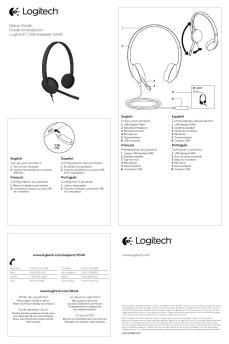
COLOR SPECIFICATIONS

BRAND / LAUNCH: Logitech 2010

PROJECT TITLE: Everest.003

SPOT COLORS

DIE LINE
COLOR
(NO PRINT)

DETAILS: AMR front/ GSW Guide

PROCESS COLORS

C

DIE LINES

M

Y

K

DIELINE NAME: n/a

5

25

50

75

95

DIELINE RECEIVED: n/a

SPECIFICATIONS / NOTES: Final files
Job is four-color

THIS PRINT SIZE / SCALE: 100% of original
Designer: Emma Ghiselli
Location: Fremont, CA, USA

MODIFICATION DATE: February 5, 2010

Getting started with

Les promotions


Declaration of Conformity - Logitech
05/12/2014 - www.logitech.com
Declaration of Conformity According to EN 45014 and Article 10 of Council Directive 89/336/EEC We, authorized representative, Logitech Ireland Services Limited, Ballincollig Cork, Ireland, declare under our sole responsibility that the following product(s): Logitech : PC Camera Model : V-UW21 is (are) tested and conform(s) with the following harmonized European standards: Emission Standard EN 55022:1998 Information technology equipment - Radio disturbance characteristics - Limits and methods of...

Zone 305 Datasheet
Zone 305 Datasheet
13/09/2024 - www.logitech.com
Fiche technique Zone 305 Certifi? pour les principales applications professionnelles et plateformes d'appel, le Zone 305 est id?al pour le d?ploiement de masse. Ce casque sans fil ultral?ger offre un son exceptionnel et des connexions fiables pour des appels clairs et ininterrompus. "C  ertifi? pour les entreprises : Le Zone 305 est en cours de certification pour Microsoft Teams via Bluetooth1 natif sans dongle. Il est ?galement certifi? pour Microsoft Teams, Zoom, Google Meet et Google Voice...

Getting started with Première utilisation Logitech® Wireless Trackball ...
11/10/2017 - www.logitech.com
1 Getting started with Première utilisation Logitech® Wireless Trackball M570 OFF ON OFF ON Getting started with Première utilisation Logitech® Wireless Trackball M570 ation inform rtant Impo 2 , and ance mpli ty, co Safe nty warra 3 F7 F9 F11 F13 F14 F15 English Insert the Unifying receiver into a computer USB port near your M570.
Getting started with Première utilisation Ultimate Ears® 600 Noise ...
16/02/2012 - www.logitech.com
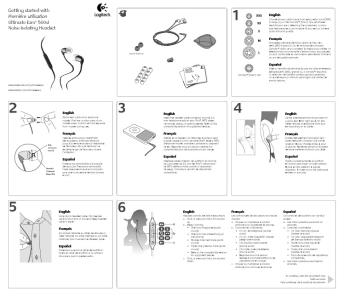
Getting started with Première utilisation Ultimate Ears® 600 Noise-Isolating Earphones ComplyTM Foam Tips d with Getting starte ation utilis Première Ears 600 Ultimate ting Earphones Noise-Isola logitech.com ultimateears.com facebook.com/ultimateears twitter.com/ultimateears an on war mati infor ce, and rtant ian Impo compl y, Safet ty English Choose an ear cushion size from extra, extra small (XXS) to large (L), or the ComplyTM Foam Tips, whichever best fits your ears. Selecting the correct...
Enhancing Steam Learning With The Logitech M650 Mouse
28/09/2025 - www.logitech.com
Verbessern Sie das STEAM-Lernen mit der Logitech M650 Maus GESPONSERT ?bersicht Scrollen, Zoomen, Schwenken  das ist mit einem Trackpad wirklich schwierig auf nat?rliche Weise m?glich & Die Maus gab den Sch?lern mehr Kontrolle und verbesserte die Navigationseffizienz, insbesondere bei 3D-Modellierungs- und Programmierarbeiten.  - JASON WHALLEY, STEAM-LEHRER Die Horner Middle School ist eine von f?nf Mittelschulen im Fremont Unified School District (Kalifornien) mit etwa 1.800 Sch?lerinnen...

Setup Installation Instalación Logitech® Z-2300
16/02/2012 - www.logitech.com
Setup Installation Instalación Z-2300 Manual_AMR.id 1 Logitech® Z-2300 5/12/04, 10:16 AM 1 CAUTION ELECTRIC SHOCK HAZARD " " " " " " " " " " Safety " " Read these instructions. Keep these instructions. Heed all warnings. Follow all instructions. Unplug the speakers from the computer and from the electrical outlet before cleaning them with a dry cloth. Install in accordance with the manufacturer s instructions. Place the speakers in a stable location so they will not fall...

Rally Accessories
Rally Accessories
07/10/2025 - www.logitech.com
DATA SHEET RALLY ACCESSORIES Logitech Rally family includes a full suite of accessories to accommodate a wide range of room sizes and configurations. Multiple mounting, mic, and speaker options provide the convenience of conferencing solutions at scale. ACCESSORIES TO SUIT EVERY MEETING SPACE Logitech Rally Bar Mini, Rally Bar, and Rally offer premier video collaboration solutions for all room shapes and sizes. Simple, versatile, and meticulously designed for scale, the Rally all-in-one video...

623018 Balaton.book - UserManual.wiki
07/03/2018 - www.logitech.com
Setup QuickCam Messenger ® © 2002 Logitech. All Rights Reserved. Logitech, the Logitech logo, and other Logitech marks are owned by Logitech and may be registered. All other trademarks are the property of their respective owners. Logitech assumes no responsibility for any errors that may appear in this manual. Information contained herein is subject to change without notice. Part Number: 623018-0403 FCC Compliance and Advisory Statement. This hardware device complies with Part 15 of the FCC...


WD Elements™ Play Multimedia Drive User Manual
11/04/2012 - www.wdc.com
WD Elements Play TM Disque dur multimédia Manuel d'utilisation Service et assistance WD® En cas de problème, merci de nous donner l'occasion de le résoudre avant de retourner ce produit. Des réponses à la majorité des questions d'assistance technique sont disponibles dans notre base de connaissances ou par le biais de notre service d'assistance par email sur http://support.wdc.com. Si vous préférez ou si la réponse n'est pas disponible, vous pouvez contacter WD à l'un des numéros...

Fiche produit Sony : 30/1209376182030.pdf
16/02/2012 - www.sony.fr
! " # o o o o o " & ' $ + - +. .0 2 2 1. 3 % $ $ ) " * ( % ( +, $ / + 4 ! ( ) + ( * , . ) . 0#0 7 ) 9 . - " #$% ' & & ( / . &0 5 0#0 7 6 &: . ( (1 12 3 6 3 4 . & 8 ( ) & ;

LAVE-VAISSELLE A AVANCEMENT AUTO.
16/04/2012 - tools.professional.electrolux.com
COMPOSITION DE LA GAMME La gamme des lave-vaisselle à avancement automatique RT110B "BASIC" est composée de 4 modèles en version électrique et à une cuve (lavage). Le chargement peut être effectué par la droite ou par la gauche et la capacité maximale est de 100 paniers/heure. Ces modèles possèdent une vitesse, un tunnel de séchage et sont équipés de série de "L'AUTOSTART" . 4 MODELES - 2 lave-vaisselle à avancement automatique avec entrée à droite et tunnel de séchage (50 et 60...

L'histoire de Canon
L'histoire de Canon
21/02/2012 - www.canon.fr
L'histoire de Canon 1961 Le boom de l'« oeil électrique » commence avec le lancement de Canonet. 1964 Lancement de la Canola 130, première calculatrice au monde à 10 touches. 1976 Canon lance le premier ordinateur au monde à être équipé d'un micro-ordinateur imbriqué, l'AE-1. 1985 Lancement de la BJ-80, première imprimante jet d'encre au monde à utiliser la technologie Bubble Jet. 1996 Lancement de l'IXUS, appareil photo de poche doté d'un zoom 2x et bénéficiant du système APS...

CHEVALET FULL TUNE (II / III), 510B ET ART
26/02/2012 - www.ibanez.co.jp
CHEVALET FULL TUNE (II / III), 510B ET ART Reglage de la hauteur Pour régler la hauteur de l'ensemble du chevalet, serrez les molettes d'ajustement de part et d'autre du chevalet (Fig. 1 A). Le chevalet 510B permet de régler la hauteur de chaque pontet. Pour ce faire, serrez les vis de réglage (Fig. 1 C) à l'aide d'une clé Allen de 1,5 mm. Fig. 1 Reglage de l'intonation Pour régler la position des pontets, serrez les vis de réglage d'intonation des pontets à régler à l'aide d'un tournevis...

bon de retour - Vtech
08/10/2019 - www.vtech-jouets.com
ATTENTION, ce bon de retour est valable pour les commandes passees sur notre site Internet. Pour tout autre retour de produits VTech achetes en magasin ou sur un site revendeur, merci de suivre la procedure decrite dans la rubrique SAV Procedure de depannage. BON DE RETOUR A COMPLETER PAR LE CLIENT : N° de commande : Date : Nom : Prenom : Adresse : Code postal : Ville : N° de tel : A ENVOYER A : VTECH ELECTRONICS EUROPE RETOUR PRODUITS - SITE INTERNET 24, allee des sablieres - CS 10503 78293...