AKT 477 FICHE PRODUIT

Extrait du fichier (au format texte) :

FR AKT 477

FICHE PRODUIT

FR

5.

8.

DIMENSIONS ET DISTANCES À OBSERVER (mm)

Bouton de commande du brûleur auxiliaire
Bandeau de commandes zone induction

9.

2

Bouton de commande du brûleur semi-rapide

7.

1

Grilles amovibles
Brûleur à 4 couronnes
Brûleur semi-rapide
Brûleur auxiliaire
Bouton de commande du brûleur à 4 couronnes

6.

3

Foyer à induction

1.
2.
3.
4.

Symboles
Robinet fermé
Grande flamme

9

8

Les promotions

Promo
14.9 € 12.9 €


9.
9.
20/03/2015 - docs.whirlpool.eu
9Ã Ã Ã Ã Ã Ã Ã Ã Ã Ã B7Ã Ã Ã Ã Ã AÃ Ã Ã Ã Ã Ã Ã Ã Ã Ã IGÃ Ã Ã Ã Ã Ã Ã

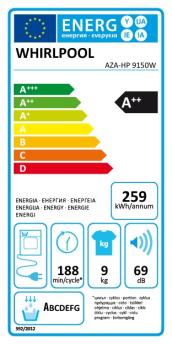
Fonctionnement du sèche-linge - LES SèCHE-LINGE
20/03/2015 - docs.whirlpool.eu
Fonctionnement du sèche-linge Pour plus d informations (y compris les informations relatives au dépannage et à l entretien), consultez la notice d emploi. Triez le linge en fonction des symboles d entretien : Pas de séchage en tambour Utilisation d un sèche-linge à tambour acceptée à basse température Utilisation d un sèche-linge à tambour acceptée Triez en fonction : De l épaisseur du linge : ne surchargez pas le tambour ; sélectionnez le linge en fonction de son épaisseur...

Bedienungsanleitungen
20/03/2015 - docs.whirlpool.eu
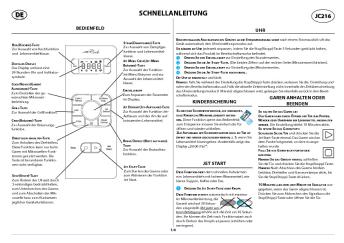
WICHTIGE SICHERHEITSHINWEISE IHRE SICHERHEIT UND DIE ANDERER PERSONEN IST SEHR WICHTIG In diesen Anweisungen sowie auf dem Gerät selbst werden wichtige Sicherheitshinweise angegeben, die Sie durchlesen und stets beachten sollten. Dieses Symbol warnt vor möglichen Gefahren für die Sicherheit des Benutzers und anderer Personen. Alle Sicherheitshinweise werden von dem Gefahrensymbol und folgenden Begriffen begleitet: GEFAHR Weist auf eine Gefahrensituation hin, die zu schweren Verletzungen führt,...

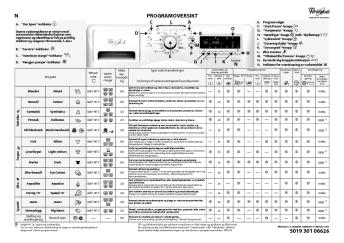
DE PROGRAMMÜBERSICHT - Billiger.de
20/03/2015 - docs.whirlpool.eu
DE PROGRAMMÜBERSICHT A. Anzeige Tür auf  C L } O Diese Waschmaschine ist mit automatischen Sicherheitsfunktionen ausgestattet, die Störungen frühzeitig erkennen können und auf diese angemessen reagieren, z. B.: E. F. G. H. I. J. K. L. M. N. O. A Eco Monitor D B 15° B. Anzeige Service  C. M Anzeige Wasserhahn zu  } D. Anzeige Pumpe 

QRG FT381 FT391 IT W10515474-R1.indd
20/03/2015 - docs.whirlpool.eu
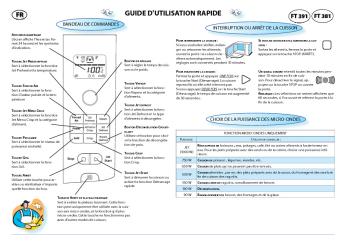
GUIDA RAPIDA IT FT 391 FT 381 PANNELLO COMANDI DISPLAY DIGITALE Il display evidenzia un orologio a 24 ore e simboli indicatori. TASTO JET PRERISCALDAMENTO Premere per selezionare la funzione Jet Preriscaldamento e impostare la temperatura desiderata. TASTO ARIA VENTILATA Premere per selezionare la funzione Aria Ventilata e impostare la temperatura desiderata. TASTO MENU JET CRISP Usare questo tasto per selezionare la funzione Menu Jet e selezionare la classe di alimento. SOSPENSIONE O INTERRUZIONE...

????? ?????????? ?? ????????? ?????? ???????? ...
????? ?????????? ?? ????????? ?????? ???????? ...
20/03/2015 - docs.whirlpool.eu
 !" #&  !  " (" !!"  "   #" %     ">20 @J:>2>4AB2> 8 A0AB02OB 206=8 ?@54C?@5645=8O 70 157>?0A=>AB, :>8B> B@O120 40 1J40B ?@>5B5=8 8 A?0720=8 ?@57 FO;>B> 2@5:0720 >?0A=0 A8BC0F8O, :>OB>, 0:> =5 A5 87153=5 I5 ?@8G8=8...

Tabla de Programas
Tabla de Programas
20/03/2015 - docs.whirlpool.eu
Funcionamiento de la secadora En los distintos apartados de las instrucciones de uso se incluye información adicional (solución de problemas y servicio de asistencia). Clasifique las prendas según los símbolos de la etiqueta No secar en secadora Apta para secar en secadora a baja temperatura Apta para secar en secadora Preparación de la ropa Carga de la secadora Selección del programa Selección de opciones (si hubiera) Puesta en marcha de la secadora Fin del programa descarga de la secadora Apagado...

FONTOS BIZTONSÁGI TUDNIVALÓK
20/03/2015 - docs.whirlpool.eu
FONTOS BIZTONSÁGI TUDNIVALÓK AZ ÖN ÉS MÁSOK BIZTONSÁGA RENDKÍVÜL FONTOS Ez a kézikönyv és maga a készülék fontos biztonsági figyelmeztetéseket nyújt, amelyeket el kell olvasni és mindenkor figyelembe kell venni. Ez a veszély szimbólum a biztonságra vonatkozóan, amely figyelmezteti a felhasználókat az Qket és másokat fenyegetQ lehetséges kockázatokra. Minden biztonsági figyelmeztetést megelQz a veszély szimbólum és a következQ kifejezések egyike: VESZÉLY! Veszélyes...


Brochure MFC-J985DW - Brother
29/05/2020 - www.brother.fr
MFC-J985DW IMPRESSION, COPIE, SCAN, FAX Plus d-encre, plus d-impressions, plus d-economies CONCUE POUR COMBINER CONNECTIVITE ET SIMPLICITE A MOINDRE COUT Il n-y a pas de petites economies. Avec le lancement de la gamme inkbenefit, Brother a concu des imprimantes qui offrent une solution fiable a tres faible cout. Aucune concession n'a ete faite sur les fonctionnalites ni sur la qualite d'impression. Le principe repose tout simplement sur des cartouches d'encre super haute capacite qui offrent...

Nvidia Story
Nvidia Story
21/06/2024 - images.nvidia.com
Our Body of Work Nothing makes me prouder than the incredible people who have made NVIDIA the company it is today. We want our company to be where they can do their life's work. Together, we continue to drive advances in AI, HPC, gaming, creative design, autonomous vehicles, and robotics some of the world's most impactful areas. I want to thank NVIDIA employees, developers, partners, customers, and families for the amazing work you do. Exciting new frontiers lie ahead. Let's seek them out together. Jensen...

EC-Declaration of Conformity to the Essential ... - Logitech
05/12/2014 - www.logitech.com
AGY-700-001232 Rev.001 EC-Declaration of Conformity to the Essential Requirements of the applicable Directive 1999/5/EC We, Logitech Ireland Services Limited, Ballincollig Cork Ireland, declare under our sole responsibility that the Radiocommunication product(s) Brand Name: LOGITECH Model Number Mice: M-RCQ142 Is (are) fully in conformity with the essential requirements of the Council Directive 1999/5/EC (R&TTE). This declaration is based on the full compliance of the product(s) with the following...

Getting started with Première utilisation Logitech® Keyboard Case
16/02/2012 - www.logitech.com
Getting started with Première utilisation Logitech® Keyboard Case for iPad 2 Logitech® Keyboard Case Contents English Français 3 6 Español Português 9 12 www.logitech.com/support 15 2 Logitech® Keyboard Case Charge the Keyboard Case Plug the micro-USB cable into the micro-USB port on the Keyboard Case. Plug the other end of the cable into a powered USB port on a computer. Paste(Command-V) Previous trackSkips to previous track on current playlist Play/PauseStarts or stops current...

tôle perforée zaki - Dampere
17/05/2016 - www.tole-perforee-sur-mesure.com
FICHE TECHNIQUE TÔLES PERFORÉES www.tole-perforee-sur-mesure.com TÔLE PERFORÉE ZAKI CATÉGORIE : MOTIF OBLONG RÉFÉRENCE : SPM 10405 PERFORATION: Trous oblong de 4x20 mm VIDE 35 % COURANT: 2000 X 1000 mm BASE: 3000 X 1500 mm MAXI: 4000 X 1500 mm MATIÈRE Acier noir | Acier galva Acier inox | Aluminium Sur demande: - bronze, laiton, cuivre - peinture thermolaquage ou anodisation bronze ou champagne ÉPAISSEUR : 2 mm et 3 mm Délai de production: 10 jours ouvrables après commande et validation...

VVX 500 Quick User Guide — UCS 4.0.1 - Polycom Support
13/06/2018 - www.polycom.fr
Touchez les éléments de l'écran pour les sélectionner et les mettre en surbrillance. Pour faire défiler les éléments, touchez l'écran tactile et faites glisser votre doigt vers le haut, le bas, la droite ou la gauche. La vue Lignes affiche les lignes téléphoniques, les favoris et les touches logicielles. Utilisez le clavier à l'écran ou les touches du clavier téléphonique pour entrer des informations. Pour effectuer un retour arrière, touchez . Pour utiliser le clavier à l'écran,...