Nintendo® Wi-Fi USB Connector Mode d'Emploi

Extrait du fichier (au format texte) :

WARRANTY & SERVICE INFORMATION

Rev. P

You may need only simple instructions to correct a problem with your product. Try our website at www.nintendo.com or call our Consumer Assistance Hotline at
1-800-255-3700, rather than going to your retailer. Hours of operation are 6 a.m. to 7
p.m., Pacific Time, Monday - Sunday (times subject to change). If the problem cannot be solved with the troubleshooting information available online or over the telephone, you will be offered express factory service through Nintendo. Please do not send any products to
Nintendo without contacting us first.
HARDWARE WARRANTY
Nintendo of America Inc. ("Nintendo") warrants to the original purchaser that the hardware product shall be free from defects in material and workmanship for twelve (12) months from the date of purchase. If a defect covered by this warranty occurs during this warranty period,
Nintendo will repair or replace the defective hardware product or component, free of charge.
The original purchaser is entitled to this warranty only if the date of purchase is registered at point of sale or the consumer can demonstrate, to Nintendo's satisfaction, that the product was purchased within the last 12 months.
GAME & ACCESSORY WARRANTY
Nintendo warrants to the original purchaser that the product (games and accessories) shall be free from defects in material and workmanship for a period of three (3) months from the date of purchase. If a defect covered by this warranty occurs during this three (3) month warranty period, Nintendo will repair or replace the defective product, free of charge.
SERVICE AFTER EXPIRATION OF WARRANTY
Please try our website at www.nintendo.com or call the Consumer Assistance Hotline at
1-800-255-3700 for troubleshooting information and repair or replacement options and pricing. In some instances, it may be necessary for you to ship the complete product, FREIGHT
PREPAID AND INSURED FOR LOSS OR DAMAGE, to Nintendo. Please do not send any products to Nintendo without contacting us first.

WARRANTY AND SERVICE INFORMATION
WARRANTY LIMITATIONS
THIS WARRANTY SHALL NOT APPLY IF THIS PRODUCT: (a) IS USED WITH PRODUCTS NOT
SOLD OR LICENSED BY NINTENDO (INCLUDING, BUT NOT LIMITED TO, NON-LICENSED
GAME ENHANCEMENT AND COPIER DEVICES, ADAPTERS, AND POWER SUPPLIES); (b) IS
USED FOR COMMERCIAL PURPOSES (INCLUDING RENTAL); (c) IS MODIFIED OR TAMPERED
WITH; (d) IS DAMAGED BY NEGLIGENCE, ACCIDENT, UNREASONABLE USE, OR BY OTHER
CAUSES UNRELATED TO DEFECTIVE MATERIALS OR WORKMANSHIP; OR (e) HAS HAD THE
SERIAL NUMBER ALTERED, DEFACED OR REMOVED.
ANY APPLICABLE IMPLIED WARRANTIES, INCLUDING WARRANTIES OF
MERCHANTABILITY AND FITNESS FOR A PARTICULAR PURPOSE, ARE HEREBY LIMITED IN
DURATION TO THE WARRANTY PERIODS DESCRIBED ABOVE (12 MONTHS OR 3 MONTHS,
AS APPLICABLE). IN NO EVENT SHALL NINTENDO BE LIABLE FOR CONSEQUENTIAL OR
INCIDENTAL DAMAGES RESULTING FROM THE BREACH OF ANY IMPLIED OR EXPRESS
WARRANTIES. SOME STATES DO NOT ALLOW LIMITATIONS ON HOW LONG AN IMPLIED
WARRANTY LASTS OR EXCLUSION OF CONSEQUENTIAL OR INCIDENTAL DAMAGES, SO
THE ABOVE LIMITATIONS MAY NOT APPLY TO YOU.
This warranty gives you specific legal rights. You may also have other rights which vary from state to state or province to province.


Les promotions


The Legend of Zelda: Twilight Princess HD - Nintendo
08/03/2018 - www.nintendo.com
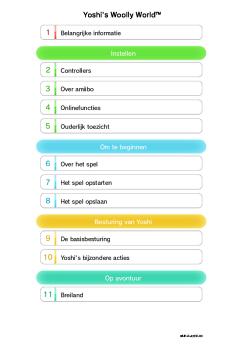
1 Informations importantes Pour commencer 2 Manettes compatibles 3 Fonctions en ligne 4 Avis aux parents et tuteurs Introduction 5 À propos du jeu 6 Début de l'aventure 7 Sauvegarder et effacer des données Écrans de jeu 8 Écran principal 9 Écran d'inventaire 10 Écran de carte 11 Écran de quête

QuickStartGuide 3DS SuperMario3DLand FR
15/08/2025 - www.nintendo.com
MAA-CTR-AREP-FRA GUIDE RAPIDE POUR LOGICIEL NINTENDO 3DS  SUPER MARIO 3D LAND!" Mode d'emploi ?lectronique S?lectionnez l'ic?ne de ce logiciel dans le menu HOME, puis touchez AIDE pour afficher son mode d'emploi ?lectronique. Lisez ce mode d'emploi attentivement pour vous assurer de profiter au mieux de votre nouveau logiciel. SUPER MARIO 3D LAND GUIDE RAPIDE Mario de feu Boule de feu Mario tanuki Coup de queue Retomber doucement Mario peut r?aliser d'autres actions en plus de celles mentionn?es ici....

Star Fox™ Guard - Nintendo
04/04/2017 - www.nintendo.com
Star Fox!" Guard 1 Informations importantes Pour commencer 2 amiibo 3 Fonctions en ligne 4 Contrôle parental Manuel de l'opérateur  Les bases 5 Les bons minerais de Corneria Ltée 6 Effacer et sauvegarder les données 7 Commandes de base 8 Commencer à jouer Manuel de l'opérateur  Guide de bataille 9 Surveiller la base 10 Défendre la base WUP-P-BWFE-00

Consolerepairs Privacypolicy Itit
27/11/2025 - www.nintendo.com
1. Nintendo of Europe SE Sede Secondaria Italiana Palazzo Tiglio Via Torri Bianche, 6 20871 Vimercate (MB) Italia Informativa sulla privacy dei Servizi di riparazione Nintendo Ultimo aggiornamento: 03.2025 Questa Informativa sulla privacy si applica all'uso del Portale Riparazioni Nintendo, che viene gestito su questo sito web da Nintendo of Europe SE ( Nintendo , noi , ci ), con sede legale in Goldsteinstrasse 235, 60528 Francoforte sul Meno, Germania, e all'elaborazione dei servizi di riparazione. Nintendo...

Es Kit De Limpieza Para Lentes De Wii
23/03/2025 - www.nintendo.com
Kit de limpieza para lentes de Wii Informaci?n del sitio web Distribuidor europeo Direcci?n Tel?fono Nombre del detergente Fabricante Nintendo of Europe GmbH Nintendo Center, D-63760, Grossostheim, Germany +4960269500 L?quido limpiador para la consola Wii Nintendo Co., Ltd. Composici?n e informaci?n sobre los ingredientes INCI AQUA ALCOHOL COCETH-3 STEAR-TRIMONIUM CHLORIDE ISOPROPYL ALCOHOL SODIUM SALICYLATE

Folleto de Instrucciones Conector Wi-Fi USB de Nintendo®
02/12/2014 - www.nintendo.com
Folleto de Instrucciones Conector Wi-Fi USB de Nintendo® ÍNDICE INTRODUCCIÓN 31 PRECAUCIONES Y NORMAS DE USO 32 COMPONENTES 33 INSTRUCCIONES PARA LA INSTALACIÓN 34-37 NORMAS PARA COMUNICACIÓN INALÁMBRICA 38 REPARACIÓN DE AVERÍAS 39 INFORMACIÓN SOBRE GARANTÍA Y SERVICIO 40-41 REGULACIONES SOBRE EL USO DEL EQUIPO EN CANADÁ Y EE.UU. 42 El Conector Wi-Fi USB de Nintendo no es compatible con centros de actividad USB (hubs), ni con tarjetas o tableros de interfaz tipo USB 1.0/2.0. NOTA: Puede...

FRANÇAIS - Nintendo
FRANÇAIS - Nintendo
02/12/2014 - www.nintendo.com
C/AGB-USA-1 PRECAUTI O NS BO O KLET PRÉCAU TI O NS À PRENDRE FO LLETO DE PRECAUCI O NES PRINTED IN CHINA IMPRIMÉ AUX CHINE PN 27549L IMPORTANT SAFETY INFORMATION - READ THE FOLLOWING WARNINGS BEFORE YOU OR YOUR CHILD PLAY VIDEO GAMES SEIZURE WARNING 13. To avoid dirt or dust from getting into the Game Boy, always leave a Game Pak loaded (with the power off), when not in use. 14. When using an AC adapter, make sure you are using the correct model appropriate for your Game Boy. Always unplug...

Kirby Battle Royale - Nintendo
08/03/2018 - www.nintendo.com
1 Informations importantes Pour commencer 2 amiibo 3 Partage d'informations 4 Internet 5 Contrôle parental 6 Gestion des données Comment jouer 7 Commandes 8 Entraînement 9 Multijoueur local 10 Multijoueur en ligne 11 Utiliser des amiibo 12 Partage des données Dépannage


Installing Your Soundtrack Pro Software - zZounds.com
27/11/2014 - manuals.info.apple.com
Installing Your Software The following information is intended to get you up and running as quickly as possible and covers the following: Â About the Contents of Your Soundtrack Pro Box (p. 2) Â About Onscreen Help (p. 3) Â Upgrading Mac OS X (p. 3) Â Installing Soundtrack Pro on a Mac OS X v10.3 (Panther) System (p. 4) Â Installing Soundtrack Pro on a Mac OS X v10.4 (Tiger) System (p. 5) Â Registering Soundtrack Pro (p. 7) Â Contacting AppleCare Support (p. 8) Be sure to also review the...

ST2FABRO
ST2FABRO
18/06/2012 - www.smeg.fr
ST2FABRO années '50 Lave-vaisselle tout intégrable, années 50, 60 cm, orbital, rose Classes A++ EAN13: 8017709144791 Porte galbée avec poignée chromée Capacité 13 couverts 5 programmes + 4 programmes rapides: Trempage, Verres, ECO, Auto 60-70, Super (avec option Quick Time: Rapide 27 min, ECO rapide, Quotidien rapide, Court & Intensif) 5 températures de lavage (38°C, 45°C, 50°C, 65°C, 70°C) Bandeau de commande inox avec afficheur pour départ différé Témoins lumineux: sel et produit...

IC Test Report - TomTom
31/01/2018 - www.tomtom.com
IC Test Report Report No. : CI331231 IC Test Report APPLICANT EQUIPMENT : TomTom International BV : GPS Navigation System BRAND NAME MODEL NAME IC STANDARD : : : : TomTom 4CR51 5767A-4CR51 ICES-003 Issue 5 The product was received on Mar. 12, 2013 and completely tested on Mar. 25, 2013. We, SPORTON INTERNATIONAL INC., would like to declare that the tested sample has been evaluated in accordance with the procedures given in ANSI C63.4-2003 and shown the compliance with the applicable technical...

Tabela 5019 396 01967 ADG 9995
20/03/2015 - docs.whirlpool.eu
Tabela Guia de referência rápida ANTES DE LIGAR O APARELHO PELA PRIMEIRA VEZ, LEIA ATENTAMENTE ESTE GUIA DE CONSULTA RÁPIDA E AS INSTRUÇÕES DE MONTAGEM! O PAINEL DE CONTROLO DESTA MÁQUINA DE LAVAR LOIÇA É ACTIVADO PREMINDO QUALQUER BOTÃO EXCEPTO O BOTÃO CANCEL/OFF. PARA POUPAR ENERGIA, O PAINEL DE CONTROLO DESACTIVA-SE AUTOMATICAMENTE AO FIM DE 30 SEGUNDOS SE NÃO SE INICIAR NENHUM CICLO. SELECTOR DE PROGRAMAS Prima (repetidamente) o botão Programas  até que o indicador do programa pretendido...

Beko Grundig Kurzbedienungsanleitung Easycurl 148x105
09/11/2025 - www.grundig.com
Ready to EasyCurl!"? So einfach geht's: 1 Power-Taste 2 Sekunden gedr?ckt halten. 2 Mit der Mode/Adjust-Taste eine Temperatur w?hlen: 160 ?C, 180 ?C oder 200 ?C. 3 Mode/Adjust-Taste 2 Sekunden gedr?ckt halten. ?ber die Timer-Einstellung bestimmst du den Dreh deiner Locken und die passende Aufheizphase. 4 Erneut die Mode/Adjust-Taste 2 Sekunden gedr?ckt halten. Stell die entsprechenden Turns ein. Wichtig: Je l?nger die Haare, desto mehr Umdrehungen braucht jede Locke. 2 3 1 4 5 8 6 7 5 Haare...

CP Nikon Pro Tour 2
CP Nikon Pro Tour 2
12/03/2012 - www.nikon.fr
Communiqué de presse Paris, le 11 janvier 2008 Nikon Pro Tour 2008 : A la rencontre des photographes professionnels Comme chaque année, Nikon organise le Nikon Pro Tour et invite gratuitement tous les photographes professionnels à cet évènement. Ce rendez-vous sera l'occasion pour les visiteurs de découvrir les nouveautés Nikon, de manipuler le matériel et d'échanger leurs points de vue. En 2008, le Nikon Pro Tour prend une nouvelle dimension en présentant l'intégralité de la chaîne...