Six Months Ended September 30, 2007

Extrait du fichier (au format texte) :

CONSOLIDATED FINANCIAL STATEMENTS
Nintendo Co., Ltd. and Consolidated Subsidiaries
October 25, 2007
Nintendo Co., Ltd.
11-1 Kamitoba hokotate-cho,
Minami-ku, Kyoto 601-8501
Japan

FINANCIAL HIGHLIGHTS
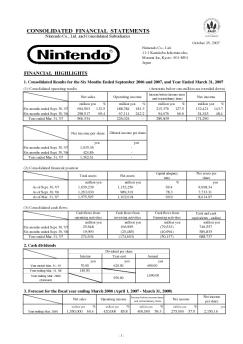
1. Consolidated Results for the Six Months Ended September 2006 and 2007, and Year Ended March 31, 2007
(1) Consolidated operating results

(Amounts below one million are rounded down)
Net sales million yen

Six months ended Sept. 30, '07
Six months ended Sept. 30, '06
Year ended Mar. 31, '07

694,803
298,817
966,534

%

million yen

188,784
67,111
226,024

132.5
69.4
-

Net income per share

%

million yen

181.3
242.2
-

215,376
94,676
288,839

Les promotions


Six Months Ended September 30, 2007
02/12/2014 - www.nintendo.co.jp
CONSOLIDATED FINANCIAL STATEMENTS Nintendo Co., Ltd. and Consolidated Subsidiaries October 25, 2007 Nintendo Co., Ltd. 11-1 Kamitoba hokotate-cho, Minami-ku, Kyoto 601-8501 Japan FINANCIAL HIGHLIGHTS 1. Consolidated Results for the Six Months Ended September 2006 and 2007, and Year Ended March 31, 2007 (1) Consolidated operating results (Amounts below one million are rounded down) Net sales million yen Six months ended Sept. 30, '07 Six months ended Sept. 30, '06 Year ended Mar. 31, '07 694,803 298,817 966,534 % million...


Getting started with Première utilisation Logitech® Wireless Headset ...
16/02/2012 - www.logitech.com
Getting started with Première utilisation Logitech® Wireless Headset H800 3 14 6 13 10 8 4 2 1 Getting started with Première utilisation Logitech® Wireless Headset H800 English Features Headset elements 1. Noise-canceling microphone 2. Flexible, rotating microphone boom 3. Adjustable headband 4. Sculpted ear pads 5. Charging port 6. Wireless connection status light 7. Battery status light Headset controls 8. Volume up 9. Volume down 10. Microphone mute 11. Play/pause or Answer call/end call...

ARCHOS CONVOCATIONS
ARCHOS CONVOCATIONS
16/03/2012 - www.archos.com
28 avril 2010 BULLETIN DES ANNONCES LEGALES OBLIGATOIRES Bulletin n° 51 CONVOCATIONS ASSEMBLÉES D'ACTIONNAIRES ET DE PORTEURS DE PARTS ARCHOS Société anonyme au capital de 8.945.308,00 euros. Siège social : 12, rue Ampère ­ ZI Igny, 91430 Igny. 343 902 821 R.C.S. Evry. SIRET: 343 902 821 000 44. AVIS DE RÉUNION VALANT AVIS DE CONVOCATION EN ASSEMBLEE GENERALE MIXTE Mesdames et Messieurs les actionnaires de la société sont convoqués en assemblée générale mixte, le 4 Juin 2010 à...

ENERGY LABEL
ENERGY LABEL
20/03/2015 - docs.whirlpool.eu
WHIRLPOOL WTV45952 NFC IX 289 341 L 2010/1060 109L 42 dB

Fiche produit Sony : 41/1189437935641.pdf
16/02/2012 - www.sony.fr
Photo Numérique DSC-H3B Le confort d'un zoom x10 dans un boîtier compact · Capteur 8M pixels et processeur BIONZ Une qualité d'image exceptionnelle · Optique Carl Zeiss et zoom optique x10 Soyez au coeur de l'action même de loin · Stabilisateur optique et Haute Sensibilité Des photos nettes en toutes circonstances · Grand écran LCD de 2.5'' (6,2cm) Un confort visuel optimal en toutes circonstances · Sortie HD Partagez vos photos en Haute Définition www.sony.fr Visuel non contractuel Caractéristiques...

Vertragsübersicht - M-Medientechnik24.de
25/11/2014 - www.epson.fr
Auf 3 Jahre erweiterte Garantie Um CoverPlus-Leistungen von EPSON zu erhalten, müssen Sie Ihren Erwerb eines EPSON CoverPlus-Pakets auf der Webseite www.epson.eu/warranty. registrieren. Hierzu benötigen Sie die auf Blatt 1 ausgedruckte Autorisierungsnummer. Mit der Registrierung schließen Sie mit Epson einen Vertrag zu nachstehenden Bedingungen ab. Wenn diese Bedingungen für Sie nicht annehmbar sind, geben Sie das EPSON CoverPlus-Paket bitte an den Händler zurück, von dem Sie es erworben haben. Vertragsbedingungen...

Getting started with Première utilisation Logitech® Touch Lapdesk ...
16/02/2012 - www.logitech.com
Getting started with Première utilisation Logitech® Touch Lapdesk N600 1 2 Getting started with Première utilisation Logitech® Touch Lapdesk N600 3 English Touchpad gestures Point, scroll, swipe 1. Point and slide one finger anywhere on the touchpad to move the on-screen pointer. 2. Scroll with two fingers, up or down. 3. Swipe left with three fingers to go back (page or picture); swipe right to go forward. Left and right click 4. Press for left button mouse click.* 5. Press for right button...