501930801050F.qxp:Layout 1

Extrait du fichier (au format texte) :

GUIDE DE CONSULTATION RAPIDE
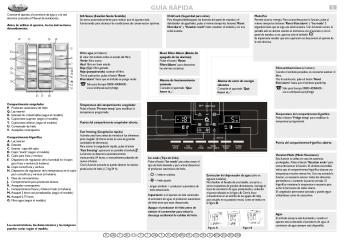
Repère pour le réglage du thermostat

Congélation des aliments frais
Placez les aliments frais à congeler à l'intérieur du compartiment congélateur. Pour congeler la quantité d'aliments indiquée sur la plaque signalétique, placez les aliments dans le bac inférieur en veillant à ne pas les mettre en contact avec les aliments déjà congelés, puis tournez le bouton thermostat vers une valeur inférieure située à mi-position (par exemple : de 4 à 3,5). Au bout de 24 heures, le processus de congélation est terminé : replacez le bouton thermostat sur la position réglée avant de congeler les aliments.

Température des compartiments congélateur et réfrigérateur
Ce réfrigérateur/congélateur est mis en service à l'aide du groupe thermostat situé à l'intérieur du compartiment réfrigérateur.
Le réglage de la température des deux compartiments s'effectue en tournant le bouton thermostat.
Thermostat sur 1/2 : refroidissement minimum
Thermostat sur 3-5 : refroidissement moyen
Thermostat sur 6/7 : refroidissement maximum
Thermostat sur ": arrêt du refroidissement et de l'éclairage

Le ventilateur est réglé comme étant DÉSACTIVÉ.
Il est recommandé d'activer le ventilateur - en appuyant sur la touche située à la base (voir figure) - lorsque la température de l'air ambiant dépasse 27 ÷ 28 °C, si des gouttes d'eau sont présentes sur les clayettes en verre ou si le taux d'humidité est particulièrement élevé.
Afin d'optimiser la consommation
énergétique, il est conseillé de désactiver le ventilateur (comme illustré dans la figure).

Si le bouton thermostat est placé sur ", l'appareil s'éteint complètement.

Ampoule/Ampoule à LED

Que faire si...

Causes possibles

L'appareil ne fonctionne pas.

Solution

Il pourrait y avoir un problème au niveau de l'alimentation électrique de l'appareil.

Zone la moins froide
Zone intermédiaire

Les promotions


fontos biztonsági tudnivalók veszély! figyelmeztetés - Orczy
20/03/2015 - docs.whirlpool.eu
FONTOS BIZTONSÁGI TUDNIVALÓK AZ ÖN ÉS MÁSOK BIZTONSÁGA NAGYON FONTOS Ez a kézikönyv és maga a készülék fontos biztonsági figyelmeztetéseket nyújt, amelyeket el kell olvasni és mindenkor figyelembe kell venni. Ez a veszély szimbólum a biztonságra vonatkozóan, amely figyelmezteti a felhasználókat az Qket és másokat fenyegetQ lehetséges kockázatokra. Minden biztonsági figyelmeztetést megelQz a veszély szimbólum és a következQ kifejezések egyike: VESZÉLY! Veszélyes...

Oven Electrical
Oven Electrical
20/03/2015 - docs.whirlpool.eu
WHIRLPOOL AKZM 8350/IXL 0.91 73 0.70

Bedienungsanleitung
Bedienungsanleitung
20/03/2015 - docs.whirlpool.eu
WICHTIGE SICHERHEITSHINWEISE IHRE SICHERHEIT UND DIE ANDERER PERSONEN IST SEHR WICHTIG In diesen Anweisungen sowie auf dem Gerät selbst werden wichtige Sicherheitshinweise angegeben, die Sie durchlesen und stets beachten sollten. Dieses Symbol warnt vor möglichen Gefahren für die Sicherheit des Benutzers und anderer Personen. Alle Sicherheitshinweise werden von dem Gefahrensymbol und folgenden Begriffen begleitet: GEFAHR Weist auf eine Gefahrensituation hin, die zu schweren Verletzungen führt,...

MACHINE OPERATION
MACHINE OPERATION
20/03/2015 - docs.whirlpool.eu
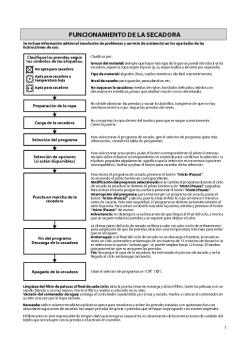
MACHINE OPERATION Additional information (including troubleshooting and service) can be found in the individual chapters of the Instructions for use. Sort laundry according to care symbols Do not tumble dry Suitable for tumble drying  at low temperatures Suitable for tumble drying Preparing laundry Loading dryer Selecting programme Selecting options (if available) Sort laundry by: Material thickness: whenever there is greater load than the dryer can handle, separate laundry according to weight...

W10748556EN.pdfDOWNLOAD
20/03/2015 - docs.whirlpool.eu
EN PROGRAMME CHART AWOC 0714 A. Door open  indication B I B. Service  indication C. Water tap closed  indication D. Clean pump  indication Care Labels E. Programme selector F. Start /Pause  button G. Spin speed selector H. Programme sequence indicator I. Reset  button J. Start delay  button A C D This washing machine is equipped with automatic safety functions which detect and diagnose faults at an early stage and react appropriately, e.g.: J G Acustic noise level...

Notice d'emploi
Notice d'emploi
20/03/2015 - docs.whirlpool.eu
IFU-TL HR F.fm Page 1 Friday, November 7, 2008 2:31 PM SOMMAIRE USAGE PRÉVU AVANT D UTILISER LE LAVE-LINGE PRÉCAUTIONS ET RECOMMANDATIONS GÉNÉRALES DESCRIPTION DU LAVE-LINGE AVANT D EFFECTUER LE PREMIER CYCLE DE LAVAGE PRÉPARATION DU CYCLE DE LAVAGE DÉTERGENTS ET PRODUITS ADDITIFS NETTOYAGE DU FILTRE/ VIDANGE DE L EAU RÉSIDUELLE NETTOYAGE ET ENTRETIEN DIAGNOSTIC RAPIDE SERVICE APRÈS-VENTE TRANSPORT ET DÉPLACEMENT INSTALLATION Black process 45.0° 100.0 LPI IFU-TL HR F.fm Page 2...

501962000006_F.qxp:Layout 1
20/03/2015 - docs.whirlpool.eu
F GUIDE DE CONSULTATION RAPIDE Avant d utiliser le lave-vaisselle, nous vous conseillons de lire les instructions de montage et d utilisation ! Pendant le cycle de rinçage anti-bactérien, si la température n est pas maintenue à un niveau constant (par exemple, en ouvrant la porte ou suite à une coupure de courant), les voyants des programmes clignotent pour signaler que l action antibactérienne n est pas garantie. Touche Marche/Arrêt Appuyez sur cette touche pour mettre le lave-vaisselle...

KÄYTTÖOHJE
KÄYTTÖOHJE
20/03/2015 - docs.whirlpool.eu
31902044FIN.fm Page 25 Friday, April 11, 2008 5:31 PM KÄYTTÖOHJE ENNEN KERAAMISEN LIEDEN KÄYTTÖÖNOTTOA ASENNUS SÄHKÖLIITÄNTÄ ENERGIANSÄÄSTÖVINKKEJÄ YMPÄRISTÖNSUOJELU VAROTOIMIA JA YLEISIÄ SUOSITUKSIA LIEDEN VARUSTEET KERAAMISEN LIEDEN PUHDISTUS JA HUOLTO VIANETSINTÄ HUOLTOPALVELU 25 31902044FIN.fm Page 26 Friday, April 11, 2008 5:31 PM ENNEN KERAAMISEN LIEDEN KÄYTTÖÖNOTTOA " Jotta saisit uudesta laitteestasi parhaan mahdollisen hyödyn, on tärkeää että luet käyttöohjeet...


Sony NXCAM Product Workflows in Sony Vegas Pro
16/02/2012 - www.sony.fr
Sony NXCAM Product Workflows in Sony Vegas Pro9 Table of Contents INTRODUCTION ..........................................................................................................................1 HXR-NX5E and the NXCAM Product Line .....................................................................1 Flexible Selection of Recording Media .........................................................................1 Dual Memory Card Slots.................................................................................................1...

F12952WH LAVE-LINGE FRONTAL
19/02/2012 - www.lg.com
FICHE PROVISOIRE LAVE-LINGE FRONTAL F12952WH MOTEUR Moteur Entraînement Contrôle Fuzzy Logic Induction DIRECT DRIVE OUI Trs/mn Kg Litres °C mn dB(A) dB(A) 1200 (0-400-600-800-1000-1200) PERFORMANCES Essorage Variable Capacité de lavage Volume tambour Thermostat Réglable Temps de lavage (40°C Coton) Niveau sonore lavage dB (PWL) Niveau sonore essorage dB (PWL) Indice de consommation d'energie Indice d'efficacité de lavage Indice d'efficacité d'essorage 9 69 95/ 60/ 40/ 30/ Froid 111 53...

FAB28LUJ
FAB28LUJ
18/06/2012 - www.smeg.fr
FAB28LUJ années '50 Réfrigérateur/congélateur, années 50, 248 litres, 60 cm, air brassé, union jack, charnières à gauche Classe énergétique A+ EAN13: 8017709110215 Façade une porte galbée avec poignée chromée Hauteur 151 cm Réfrigérateur: Volume net: 222 litres Thermostat réglable Froid dynamique par air brassé Dégivrage automatique réfrigérateur 3 clayettes verre Clayette porte-bouteilles chromée 1 grand bac à légumes avec dessus verre Evaporateur in situ Contre-porte...

Nvidia Story
Nvidia Story
21/06/2024 - images.nvidia.com
Our Body of Work Nothing makes me prouder than the incredible people who have made NVIDIA the company it is today. We want our company to be where they can do their life's work. Together, we continue to drive advances in AI, HPC, gaming, creative design, autonomous vehicles, and robotics some of the world's most impactful areas. I want to thank NVIDIA employees, developers, partners, customers, and families for the amazing work you do. Exciting new frontiers lie ahead. Let's seek them out together. Jensen...

Logitech Alert?Video Security System
05/12/2014 - www.logitech.com
Logitech Alert™ Video Security System Getting To Know Getting To Know Contents Introduction . . . . . . . . . . . . . . . . . . . . . . . . . . . . . . . . . . . . . . . . . . . . . . . . . . . . . . . . . . . . . . . . 3 Live Mode Viewing . . . . . . . . . . . . . . . . . . . . . . . . . . . . . . . . . . . . . . . . . . . . . . . . . . . . . . . . . . 4 Viewing Recorded Video . . . . . . . . . . . . . . . . . . . . . . . . . . . . . . . . . . . . . . . . . . . . . . . . . . . . . 5 Motion...

620-002004.003 EMEA-Alert-Indoor-Master_Front
16/02/2012 - www.logitech.com
Getting started with Logitech Alert!" 750i 1 3 2 English 4 1 Logitech Alert Camera 2 Software Install CD 3 Camera power supply 4 Network adapter 5 Power supply cable (yellow tips) 6 Network bridge cable (blue tips) 7 microSD!" card adapter 8 Suction cup 9 Power supply cable extender 10 Desktop stand 11 System Requirements Guide 12 Getting to Know Guide 13 Mounting accessories 8 7 6 5 0i Logitech Alert 700i/75ents !" Quick-start guide System Requirem & Support Guide Quick-start guide 13 GETTING...