E DESCRICPION DEL APARATO Page 52 ANTES DE ...

Extrait du fichier (au format texte) :

N

C

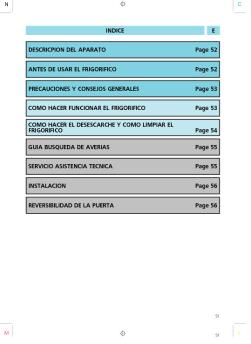
INDICE

E

DESCRICPION DEL APARATO

Page 52

ANTES DE USAR EL FRIGORIFICO

Page 52

PRECAUCIONES Y CONSEJOS GENERALES

Page 53

COMO HACER FUNCIONAR EL FRIGORIFICO

Page 53

COMO HACER EL DESESCARCHE Y COMO LIMPIAR EL
FRIGORIFICO

Page 54

GUIA BUSQUEDA DE AVERIAS

Page 55

SERVICIO ASISTENCIA TECNICA

Page 55

INSTALACION

Page 56

REVERSIBILIDAD DE LA PUERTA

Page 56

51

M

51

Les promotions

Promo
14.9 € 12.9 €


VIGTIGE SIKKERHEDSVEJLEDNINGER ADVARSEL: FARE:
20/03/2015 - docs.whirlpool.eu
VIGTIGE SIKKERHEDSVEJLEDNINGER DIN SIKKERHED OG ANDRES ER DET VIGTIGSTE Denne vejledning og apparatet selv indeholder vigtige sikkerhedsadvarsler, som skal læses og overholdes på alle tidspunkter. Dette er opmærksomheds-symbolet, hvad angår sikkerhed, som advarer brugere om potentielle risici for dem selv og andre. Alle sikkerhedsadvarsler indledes med opmærksomheds-symbolet og de følgende udtryk: FARE: Angiver en farlig situation, som, hvis den ikke undgås, vil forårsage alvorlig kvæstelse. ADVARSEL: Angiver...

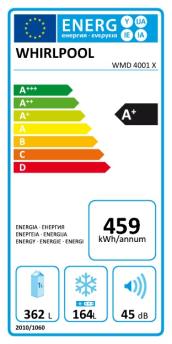
ENERGY LABEL
ENERGY LABEL
20/03/2015 - docs.whirlpool.eu
WHIRLPOOL ADG 8793 A++ PC TR FD A A A A A A A 266 3220 ABCDEFG 2010/1059 X14 42

important safety instructions danger warning - whirlpool ...
20/03/2015 - docs.whirlpool.eu
IMPORTANT SAFETY INSTRUCTIONS YOUR SAFETY AND THAT OF OTHERS IS VERY IMPORTANT This manual and the appliance itself provide important safety warnings, to be read and observed at all times. This is the danger symbol, pertaining to safety, which alerts users to potential risks to themselves and others. All safety warnings are preceded by the danger symbol and the following terms: DANGER Indicates a hazardous situation which, if not avoided, will cause serious injury. WARNING Indicates a hazardous...

Bedienungsanleitungen
20/03/2015 - docs.whirlpool.eu
WICHTIGE SICHERHEITSHINWEISE IHRE SICHERHEIT UND DIE ANDERER PERSONEN IST SEHR WICHTIG In diesen Anweisungen sowie auf dem Gerät selbst werden wichtige Sicherheitshinweise angegeben, die Sie durchlesen und stets beachten sollten. Dieses Symbol warnt vor möglichen Gefahren für die Sicherheit des Benutzers und anderer Personen. Alle Sicherheitshinweise werden von dem Gefahrensymbol und folgenden Begriffen begleitet: GEFAHR Weist auf eine Gefahrensituation hin, die zu schweren Verletzungen führt,...

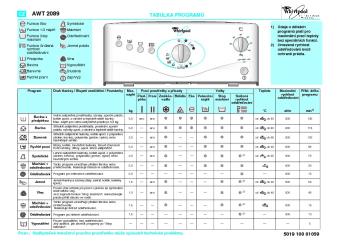
D WAT Care 12 5019 412 10090 PROGRAMMTABELLE
20/03/2015 - docs.whirlpool.eu
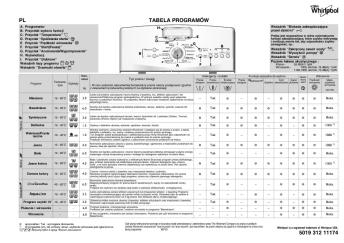
D WAT Care 12 PROGRAMMTABELLE A. Programmwahlschalter B. Taste Startvorwahl  C. Programmablaufanzeige (Über der Linie) D. E. F. G. Programm I Diese Waschmaschine ist mit automatischen Sicherheitsfunktionen ausgestattet, die Störungen frühzeitig erkennen und angemessen reagieren, zum Beispiel: H. Anzeige Service  I. Anzeige Wasserhahn zu  J. Anzeige Pumpe reinigen  G H J Leuchtanzeigen der Startvorwahl (Neben die Linie) Schleuderdrehzahl-Wahlschalter Taste Start/Pause  Taste...

important safety instructions warning - whirlpool documents
20/03/2015 - docs.whirlpool.eu
IMPORTANT SAFETY INSTRUCTIONS YOUR SAFETY AND THAT OF OTHERS IS PARAMOUNT This manual and the appliance itself provide important safety warnings, to be read and observed at all times. This is the attention symbol, pertaining to safety, which alerts users to potential risks to themselves and others. All safety warnings are preceded by the attention symbol and the following terms: DANGER: WARNING: indicates a hazardous situation which, if not avoided, will cause serious injury. indicates a hazardous...

guida di riferimento rapido
20/03/2015 - docs.whirlpool.eu
GUIDA DI RIFERIMENTO RAPIDO IT PANNELLO DI CONTROLLO PROTEZIONE BAMBINI DISPLAY DIGITALE Il display include l orologio col formato delle 24 ore e simboli indicativi. TASTO POTENZA Usato per impostare il livello voluto di potenza microonde. TASTO SCONGELAMENTO RAPIDO Usare per selezionare la funzione Scongelamento rapido e selezionare il tipo di alimento da scongelare. MANOPOLA DI REGOLAZIONE Usata per impostare il tempo di cottura o il peso. TASTO GRILL Usato per selezionare la funzione Grill. TASTO...

FIN OHJELMATAULUKKO 5019 300 01950
20/03/2015 - docs.whirlpool.eu
FIN OHJELMATAULUKKO A. Luukku auki -merkkivalo G. Ohjelmavaiheen osoitin B H. Reset-painike H E Hoitoohjemerkinnät F. Käynnistys/Tauko -painike A C D B. Huolto-merkkivalo C. Vesihana kiinni -merkkivalo D. Puhdista pumppu -merkkivalo Ohjelma E. Ohjelmanvalitsin G Tässä pesukoneessa on automaattisia turvatoimintoja, jotka havaitsevat ja ilmaisevat mahdolliset häiriöt varhaisessa vaiheessa, jotta voit toimia tilanteen vaatimalla tavalla, esimerkiksi: F Pesu- ja lisäaineet Max. täyttö kg Lisävalinnat ...


Guide des fonctions avancées de mywishTV - Thomson
15/12/2016 - www.thomsontv.fr
Guide des fonctions avancées de mywishTV Table des matières Présentation des fonctionalités avancées de mywishTV Raccorder au réseau domestique et à Internet Logiciel serveur dlna pour votre pc Navigation Configuration - Connexion filaire Configuration - Connexion sans fil Configuration - Testez votre connexion Configuration - VOD - Stocker et effacer Mes Films Mes Médias Mes Radios Configuration -...

Headset Portfolio
Headset Portfolio
25/09/2024 - www.logitech.com
Logitech business headsets - wired Hybrid work requires solutions designed for all types of users and work environments. Regardless of your style or connectivity preference, Logitech business headset portfolio has a device that works the way you do. Logitech headsets and earbuds are designed to work seamlessly with leading video conferencing platforms, giving you an enhanced video collaboration experience. H570e Product Name Connectivity Teams version H650e UC version 1 (USB-A or USB-C) Range 1 (USB-A) 6.2...

ARCHOS étend sa ligne de magnétoscopes numériques de poche ...
16/03/2012 - www.archos.com
Information Presse Jeudi 22 septembre 2005 ARCHOS étend sa ligne de magnétoscopes numériques de poche avec l'AV 500 Disponible en versions 30 Go1 et 100 Go1, le magnétoscope numérique de poche ARCHOS AV 500 permet d'enregistrer, de lire, de stocker, d'organiser et de regarder un large choix de vidéos, de photos et de chansons au format numérique. ARCHOS, leader technologique et pionnier sur le marché de l'audio/vidéo nomade, présente aujourd'hui l'AV 500, le successeur de son magnétoscope...

Un Chiffre d'affaires en croissance de 6% sur le ... - Archos
11/05/2020 - www.archos.com
Communique de presse : Resultats du 1er semestre 2014 Igny, le 8 Aout 2014 Un Chiffre d'affaires en croissance de 6% sur le semestre Resultats du 1er semestre 2014 Compte de Resultat Synthetique (en M ¬) Chiffre d'affaires Marge Brute Marge brute en % du CA Charges d'exploitation Resultat operationnel Resultat financier Impot sur les resultats Resultat net ARCHOS ARCHOS sans LOGIC INSTRUMENT LOGIC INSTRUMENT ARCHOS S1 2014 S1 2014 du 23 janvier au 30 juin 2014 S1 2013 57,3 10,4 18,2% 12,3 -1,9 -0,2 -0,2 -2,3 54,3 9,4 ...

Fiche produit Sony : 78/1189437935778.pdf
16/02/2012 - www.sony.fr
Communiqué de presse Paris, le 30 août 2007 VAIO : la révolution Blu-ray DiscTM VAIO série L VAIO série AR VAIO série FZ · · VAIO met la technologie Blu-ray DiscTM à la portée de tous Visionner des films en Haute Définition, enregistrer des programmes TV HD et monter ses vidéos personnelles en Haute Définition, le tout sur un ordinateur VAIO Il y a à peine plus d'un an, Sony VAIO lançait en première mondiale un ordinateur portable intégrant un graveur Blu-ray DiscTM complet....

Merhaba. - Support - Apple
27/11/2014 - manuals.info.apple.com
Yeni iPhone nunuza ho_geldiniz. Size onu tan1tmak isteriz. Önce, Aç/Kapat dümesini birkaç saniye bas1l1 tutarak iPhone unuzu aç1n. Sonra, iPhone unuzu ayarlamak için ekrandaki yönergeleri izleyin. Temel düme bilgileri iPhone u kapatmak veya yeniden ba_latmak için, Aç/Kapat dümesini birkaç saniye bas1l1 tutun ve daha sonra dorulamak için sürgüyü kayd1r1n. Ekran1 kapatmak ama aramalar1 almaya devam etmek için, Aç/Kapat dümesine bir kez bas1n. 0stediiniz...