WARNING - Seizures WARNING - Repetitive ... - Nintendo

Extrait du fichier (au format texte) :

AGB-MP-USA

T he official seal is your assurance that this product is licensed or manufactured by N intendo. A lways look for this seal when buying video game systems, accessories, games and related products.

C e sceau officiel est votre garantie que le présent produit est breveté ou manufacturé par N intendo. R echerchez-le toujours quand vous achetez des appareils de jeu vidéo, des accessories, des jeux et d'autres produits connexes.
E l sello le garantiza que este producto es licenciado o fabricado por N intendo. B usque siempre este sello al comprar sistemas de videojuego, accesorios, juegos, y productos relacionados.
Nintendo does not license the sale or use of products without the Official Nintendo Seal.®
Nintendo n'autorise pas la vente ou l'utilisation de produits ne portant pas le Sceau officiel de Nintendo.®
Nintendo no licencia la venta o uso de productos sin el Sello Oficial de Nintendo.®

T H IS V IDE O PA K W IL L W O R K O N LY W IT H T HE G A M E B O Y ® A DV A N C E V IDE O
G A M E S Y S T E M . N O T C O M PAT IB L E W IT H O T H E R G A M E B O Y S Y S T E M S O R
T H E G A M E B O Y P L AY E R A C C E S S O R Y.
C E T T E C A R T O U C H E V IDÉ O N 'E S T C O M PAT IB L E Q U 'AV E C L 'A P PA R E IL DE J E U
V IDÉ O G A M E B O Y A DV A N C E . IL N 'E S T PA S C O M PAT IB L E AV E C L E S A U T R E S
A P PA R E IL S G A M E B O Y, O U L 'A C C E S S O IR E G A M E B O Y P L AY E R .
E S T E CA R T U CHO DE V IDE OS FU N CION A R A Ú N ICA M E N T E CON E L S IS T E M A DE
V IDE OJ U E G OS DE G A M E B OY A DV A N CE . N O E S COM PAT IB LE CON OT R OS
S IS T E M A S DE G A M E B OY, N I CON E L A CCE S OR IO DE G A M E B OY PLAY E R .

N IN T E N DO, G A M E B OY, G A M E B OY A DVA N CE V IDE O A N D T HE
OFFICIA L S E A L A R E T R A DE M A R K S OF N IN T E N DO.
© 2004 N IN T E N DO. A LL R IG HT S R E S E RV E D.

54223A

GAME BOY® ADVANCE SP

When watching a video, the A and B Buttons are for brightness control (+/-).
Quand vous regardez un vidéo, les boutons A et B règle la brillance de l'image (+/-).
Al ver un vídeo, los Botones A y B se utilizan para ajustar el brillo (+/-).

(These functions also work with the Game Boy Advance system.)
(Ces fonctions sont aussi utilisées sur le Game Boy Advance.)
(Estas operaciones también funcionan con el sistema de
Game Boy Advance.)

R Button: Skip Search Forward
Bouton R: Saut arrière
Botón R: Saltar Adelante

L Button: Skip Search Backward
Bouton L: Saut avant

Les promotions


Super Mario Maker for Nintendo 3DS 1 Informations importantes ...
08/03/2018 - www.nintendo.com
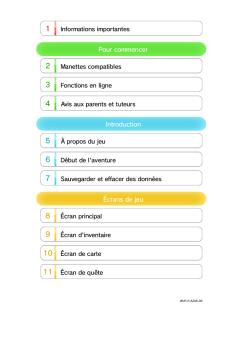
Super Mario Maker for Nintendo 3DS 1 Informations importantes Informations de base 2 Partage d'informations 3 Fonctions en ligne 4 Contrôle parental Pour commencer 5 Mary O. et Yamamura Créer des niveaux 6 Création et sauvegarde 7 Techniques de Mario Maker Jouer aux niveaux 8 Jouer aux niveaux 9 Incarner Mario Menu principal 10 Menu principal 11

Nintendo3DS NFCReaderWriter DeclarationOfConformity
13/05/2025 - www.nintendo.com
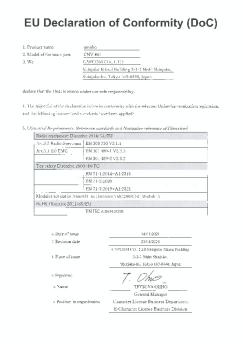
EU Declaration of Conformity (DoC) Object of the declaration main unit

Health and Safety Information - Nintendo
02/12/2014 - www.nintendo.com
6 5 WARNING - Battery Leakage Health and Safety Information Throughout this manual, you will see this symbol followed by WARNING or CAUTION, or you may see the term IMPORTANT. These terms have different levels of meaning as outlined below. Please read and understand these terms and the information that appears after them before using your Nintendo DSi XL system: WARNING Warns you about incorrect use of the Nintendo DSi XL that could result in serious personal injury. CAUTION Cautions you...

Basic Controls StreetPass and Beyond - Nintendo
02/12/2014 - www.nintendo.com
Basic Controls If you select Normal difficulty, you ll see a series of tutorial Slide Guides  to explain the basics of battle. For first-time players of Fire Emblem!" series or fans who have been away for a while, the Slide Guide will get you up to speed quickly and easily. Open Preparations Menu C o n t in u e En t er m a p lo ca ti o n S elect u n it t o c o mma n d ( O n a n y u n o c c u p i e d t i l e) O p en sy st em m e n u Ba c k S elect it em C o n t in u e V iew Help S elect a n...

Consolerepairs Privacypolicy Ptpt
16/03/2025 - www.nintendo.com
Nintendo of Europe SE Sucursal em Espanha C / Est?banez Calder?n, N? 3-5 Edificio Discovery, Planta 6? 28020 Madrid Espanha POL?TICA DE PRIVACIDADE DOS SERVI?OS DE REPARA??O DA NINTENDO Esta Pol?tica de Privacidade aplica-se ? utiliza??o do Portal de Repara??o Nintendo a funcionar neste site por parte da Nintendo of Europe SE ("Nintendo", "n?s", "nos"), Goldsteinstrasse 235, 60528 Frankfurt am Main, Alemanha, e ao processamento de servi?os de repara??o. A Nintendo ? a respons?vel pelo tratamento...

Dsa Transparency Report As At 28th February 2025
30/10/2025 - www.nintendo.com
Digital Services Act (DSA): Nintendo Transparency Report for the EU market as at 28th February 2025 Introduction: At Nintendo, we want to create experiences that put smiles on faces for everyone. In order to achieve this, it is crucial to keep our Nintendo games, and online services safe, friendly, welcoming, and fun for all. Our Community Guidelines outline our expectations when engaging with our Nintendo products or services. The Nintendo Code of Conduct in the Nintendo Account Agreement also...

Hey! PIKMIN - Nintendo
12/10/2017 - www.nintendo.com
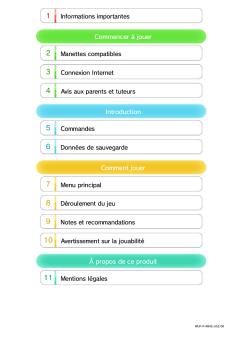
1 Informations importantes Informations de base 2 amiibo 3 Fonctions en ligne Introduction 4 Commencer à jouer 5 Données de sauvegarde Explorer une zone 6 Écran de jeu 7 Explorer la planète 8 Olimar et les Pikmin Encore plus de plaisir 9 Parc Pikmin 10 amiibo Communications sans fil 11 SpotPass Dépannage

Pages 28-55 - Nintendo
04/04/2017 - www.nintendo.com
C/USG-USA NEED HELP WITH INSTALLATION, MAINTENANCE OR SERVICE? NINTENDO CUSTOMER SERVICE: WWW.NINTENDO.COM or call 1-800-255-3700, MON.-SUN., 6:00 a.m. to 7:00 p.m, Pacific Time (Times subject to change) TTY Hearing Impaired: 800-422-4281 BESOIN D'AIDE AVEC L'INSTALLATION, L'ENTRETIEN OU LE SERVICE ? SERVICE À LA CLIENTÈLE DE NINTENDO: www.nintendo.ca Ou appelez le 1-800-255-3700 LUN.-DIM., entre 6 h 00 et 19 h 00 , heure du Pacifique. (Heures sujettes à changement) Service à la clientèle...


WD Scorpio® Blue™ - Product Overview
11/04/2012 - www.wdc.com
WD Scorpio Blue TM ® Disques durs SATA/PATA Faites le plein et partez avec Capacité massive Faible consommation d'énergie Très basse température et silencieux Avec des capacités pouvant atteindre 1 To, les disques durs 2,5 pouces WD Scorpio Blue SATA et PATA combinent hautes performances et faible consommation d'énergie pour tous les types d'appareils numériques portables. WD Scorpio Blue Disques durs SATA/PATA Fonctionnalités du produit Capacité massive très basse température...

Mode d'emploi - Hotpoint
11/07/2017 - www.hotpoint.fr
Mode d emploi SÈCHE-LINGE Table des matières FR Informations importantes, 2-3 FR Français,1 Installation, 4 Où placer votre sèche-linge ? Ventilation Raccords électriques Avant d utiliser votre sèche-linge Description du sèche-linge, 5 Ouverture du hublot Fonctions Tableau de commande Affichage, 6 Démarrage et programmes, 7-12 AQUALTIS AQC9 BF5 Sélection d un programme Programmes spéciaux Tableau des programmes Commandes Linge, 13-14 Trier votre linge Conseil de lavage Vêtements...

WD ShareSpace™ Network Storage System - Quick Install Guide
11/04/2012 - www.wdc.com
Service et assistance WD En cas de problème, merci de nous donner l'occasion de le résoudre avant de retourner ce produit. Des réponses à la majorité des questions d'assistance technique sont disponibles dans notre base de connaissances ou par le biais de notre service d'assistance par email sur support.wdc.com. Si vous préférez ou si la réponse n'est pas disponible, vous pouvez contacter WD à l'un des numéros de téléphones présentés ci-dessous. Votre produit est fourni avec 30 jours...

SFT105 - Smeg
SFT105 - Smeg
29/06/2016 - www.smeg.fr
SFT105 linéa SMEG ELITE Four électronique multifonction, vapor clean, catalyse, 60 cm, inox / verre Stopsol® supersilver, chaleur brassée Classe énergétique A EAN13: 8017709173135 12 fonctions (dont 1 de nettoyage assisté Vapor Clean) Manettes de commande translucides Programmateur électronique : départ et fin de cuisson avec signal sonore (le four s arrête automatiquement) Afficheur LCD indiquant programmation, heure, température préconisée et fonction 4 modes de décongélation Contrôle...

TT15s1
TT15s1
30/06/2016 - www.marantz.fr
               TT15s1                  Pour les puristes de l analogique, voici la platine tourne-disque TT15S1 de la gamme Premium. Le châssis en résine acrylique massif, le lourd plateau en acrylique de 3 cm d épaisseur couvert d un feutre noir, les pieds en aluminium et les paliers en céramique dernier-cri, éliminent la résonnance du châssis. Le système MM exclusif Marantz dans un élégant corps en ébène est directement fixé au câble d interconnexion...

Time Capsule Setup Guide - Support - Apple
27/11/2014 - manuals.info.apple.com
Time Capsule Setup Guide Contents 5 7 8 9 11 Chapter 1: Getting Started About Your Time Capsule About the AirPort Software What You Need to Get Started The Time Capsule Status Light 13 14 17 19 19 21 22 23 Chapter 2: Setting Up Your Time Capsule Using Your Time Capsule to Create Your Wireless Network Using AirPort Utility Creating a New Wireless Network Configuring and Sharing Internet Access Setting Advanced Options Allowing Wireless Clients to Access Your Network Without Entering a Password Using...