Bedienung des Gerätes - Billiger.de

Extrait du fichier (au format texte) :

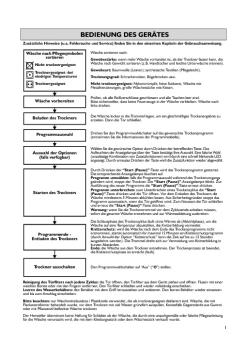
Bedienung des Gerätes
Zusätzliche Hinweise (u.a. Fehlersuche und Service) finden Sie in den einzelnen Kapiteln der Gebrauchsanweisung.

Wäsche nach den jeweiligen
Pflegesymbolen sortieren:
Nicht trocknergeeignet

Wäsche sortieren nach:
Gewebestärke: wenn die Wäscheladung größer ist als das Fassungsvermögen des
Trockners, die Wäsche nach Gewicht sortieren (z.B. Handtücher und leichte
Unterwäsche trennen).

Trocknergeeignet - bei niedriger Trockentemperatur

Gewebeart: Baumwolle (Leinen); Synthetische Textilien (Pflegeleicht).

Trocknergeeignet

Nicht Trocknergeeignet: Wolle, Seide, Nylonstrümpfe, feine Stickereien, Textilien mit Metallbesatz, große Wäschestücke wie Schlafsäcke oder Kopfkissen.

Trockengrad: Schranktrocken, bügeltrocken usw.

Wäsche vorbereiten

Prüfen, ob alle Reißverschlüsse geschlossen und alle Taschen leer sind. Es dürfen keine
Feuerzeuge in der Wäsche verbleiben. Wäsche auf links drehen.

Beladen des Trockners

Die Wäsche locker in die Trommel legen, um ein gleichmäßiges Trockenergebnis zu erzielen. Dann schließen Sie die Tür.

Auswahl des Programms

Drehen Sie den Programmwahlschalter auf das gewünschte Trockenprogramm
(weitere Informationen siehe Programmtabelle).

Zusatzfunktionen wählen
(sofern vorhanden)

Wählen Sie die gewünschte Zusatzfunktion durch Drücken der entsprechenden Taste aus.
Das Aufleuchten der Anzeige über der Taste bestätigt Ihre Auswahl.
Eine schnell blinkende LED zeigt an, dass eine ungültige Auswahl getroffen wurde
(inkompatible Option). Durch erneutes Drücken der Taste wird die Zusatzfunktion wieder abgewählt.

Trockner starten

Les promotions

Promo
14.9 € 12.9 €


Tutti i messaggi relativi alla sicurezza specificano il ...
20/03/2015 - docs.whirlpool.eu
ISTRUZIONI IMPORTANTI PER LA SICUREZZA LA SICUREZZA VOSTRA E DEGLI ALTRI È MOLTO IMPORTANTE Questo manuale e l apparecchio stesso forniscono importanti avvisi per la sicurezza, che devono essere letti e a cui è necessario attenersi sempre. Questo è il simbolo di pericolo per la sicurezza, che avverte gli utenti dei potenziali rischi per se stessi e per gli altri. Tutti i messaggi relativi alla sicurezza saranno preceduti dal simbolo di pericolo e dai seguenti termini: PERICOLO Indica una situazione...

GUIDE DE DÉMARRAGE
GUIDE DE DÉMARRAGE
20/03/2015 - docs.whirlpool.eu
GUIDE DE DÉMARRAGE Fonction ON/STANDBY Pour mettre l'appareil en veille, appuyez sur la touche On/Standby et maintenez-la enfoncée pendant 3 secondes. Tous les voyants de température s'éteignent. Appuyez de nouveau sur cette touche pour réactiver l'appareil. (voir la notice d'utilisation) 1 2 3 4 16 5 12 7 X Touche TEMPERATURE X Led ON high temp. Led OFF temp. élevée high temp. med-high temp. 8 9 10 17 11 13 14

Tableau 5019 300 01361
20/03/2015 - docs.whirlpool.eu
Tableau Guide de consultation rapide AVANT D'UTILISER L'APPAREIL POUR LA PREMIERE FOIS, LISEZ ATTENTIVEMENT CE GUIDE DE CONSULTATION RAPIDE ET LES INSTRUCTIONS D'INSTALLATION ! (voir description des options ci-contre) SELECTEUR DE PROGRAMME Appuyez (plusieurs fois) sur la touche « P », jusqu'à ce que le numéro du programme sélectionné s'affiche à l'écran (P1...Px) - voir le « Tableau des programmes » ci-dessous. TOUCHE DEPART/REPRISE Appuyez sur cette touche pour démarrer le programme...

QRG GT286 GB W10507596.indd
20/03/2015 - docs.whirlpool.eu
QUICK REFERENCE GUIDE GB DIGITAL DISPLAY The display includes a 24-hour clock and indicator symbols. JET DEFROST BUTTON Use to select Jet Defrost function and select type of food to be defrosted. THIS AUTOMATIC SAFETY FUNCTION IS ACTIVATED 1 MINUTES AFTER the oven has returned to stand bymode . In this mode the door will be locked. THE DOOR MUST BE OPENED AND CLOSED e.g. putting food into it, before the safety lock is released. Else the display will show DOOR . COOK & REHEAT WITH MICROWAVES USE...

5019 301 10042 FL 5103 RO
20/03/2015 - docs.whirlpool.eu
RO FL 5103 A. Buton Pornire Întârziat  B. Indicacie Pornit/Oprit (On/Off) A În timpul programului de splat seleccionat butonul de selectare a programului se mic pe etape în sensul acelor de ceasornic prin toate fazelepresplare, splare principal, limpezire i centrifugare. Fiecare etap dureaz de la câteva secunde pân la câteva minute. B h : opcional / Da : dozaj necesar 1 2 Programul Simbol splare Tip de rufe/Notice Încrcare maxim Înlbitor Pentru...

artisan™ blender artisan™ blender blender/mixeur artisan ...
20/03/2015 - docs.whirlpool.eu
ARTISAN!" BLENDER INSTRUCTIES ARTISAN!" BLENDER INSTRUCTIONS BLENDER/MIXEUR ARTISAN!" INSTRUCTIONS ARTISAN!" BLENDER/STANDMIXER BEDIENUNGSANLEITUNG FRULLATORE ARTISAN!" ISTRUZIONI PER L USO LICUADORA ARTISAN!" Français INSTRUCCIONES ARTISAN!" MIXER INSTRUKTIONER ARTISAN!" BLENDER BRUKSANVISNING ARTISAN!"-TEHOSEKOITIN OHJEET ARTISAN!" BLENDER INSTRUKTIONER LIQUIDIFICADOR ARTISAN!" INSTRUÇÕES ARTISAN!" BLANDARI LEIÐBEININGAR œ ›•¤•¡ ARTISAN!" O”H“IE£ Blender/mixeur modèle...

Tableau
Tableau
20/03/2015 - docs.whirlpool.eu
Tableau Guide de consultation rapide AVANT D'UTILISER L'APPAREIL POUR LA PREMIERE FOIS, LISEZ ATTENTIVEMENT CE GUIDE DE CONSULTATION RAPIDE ET LES INSTRUCTIONS D'INSTALLATION ! POUR ACTIVER LE BANDEAU DE COMMANDE DE CE LAVE-VAISSELLE, IL SUFFIT D'APPUYER SUR UNE TOUCHE QUELCONQUE, A L'EXCEPTION DE LA TOUCHE ANNULATION/ARRET. POUR REDUIRE LA CONSOMMATION D'ENERGIE, LE BANDEAU DE COMMANDE S'ETEINT AUTOMATIQUEMENT AU BOUT DE 30 SECONDES SI AUCUN CYCLE N'A ETE DEMARRE. INDICATEUR DE FONCTIONNEMENT VOYANT...

FUNZIONAMENTO DELL'APPARECCHIO
20/03/2015 - docs.whirlpool.eu
FUNZIONAMENTO DELL APPARECCHIO Per ulteriori informazioni (incluse quelle sulla risoluzione dei guasti e il servizio di assistenza), consultare i singoli capitoli delle Istruzioni per l uso. Suddividere la biancheria in base ai simboli di cura dei capi Non asciugare a macchina Suddividere la biancheria per: Spessore del tessuto: se il carico è eccessivo rispetto alla capacità dell asciugatrice, separare la biancheria in base al peso (ad esempio, dividere gli asciugamani spessi dalla biancheria...


Fiche produit Sony : 63/1237479622363.pdf
16/02/2012 - www.sony.fr
VAIO en toute sérénité Les garanties VAIO et leurs Extensions Modèles VAIO grand public Garantie standard 1 an* Extensions de Garantie PCGE-VPW1 PCGE-VPW2 Modèles VAIO Professionnels Garantie standard 2 ans* internationale (VIRS) Extensions de Garantie PCGE-VPW1 VGPE-VPPSL3 + 1 an + 2 ans 3 années de garantie ! 2 + 1 an PCGE-VPW2 + 2 ans = 3 ans sur site à J+1 = 4 années de garantie ! * Voir liste des modèles concernés Conditions de garantie VAIO gamme grand public · Concerne...

Six Months Ended September 30, 2007
02/12/2014 - www.nintendo.co.jp
CONSOLIDATED FINANCIAL STATEMENTS Nintendo Co., Ltd. and Consolidated Subsidiaries October 25, 2007 Nintendo Co., Ltd. 11-1 Kamitoba hokotate-cho, Minami-ku, Kyoto 601-8501 Japan FINANCIAL HIGHLIGHTS 1. Consolidated Results for the Six Months Ended September 2006 and 2007, and Year Ended March 31, 2007 (1) Consolidated operating results (Amounts below one million are rounded down) Net sales million yen Six months ended Sept. 30, '07 Six months ended Sept. 30, '06 Year ended Mar. 31, '07 694,803 298,817 966,534 % million...

Xserve Intel (Late 2006) DIY Procedure for Logic ... - Support
27/11/2014 - manuals.info.apple.com
øÿ Xserve (Late 2006) Logic Board Replacement Instructions Follow the instructions in this document carefully. Failure to follow these instructions could damage your equipment and void its warranty. Online instructions are available at http://www.apple.com/support/diy/. Working Safely Inside the Xserve Always touch the Xserve enclosure to discharge static electricity before you touch any components inside the Xserve. To avoid generating static electricity, do not walk around the room until...

Setting Up Your Computer - Support - Apple
27/11/2014 - manuals.info.apple.com
C H A P T E R 1 Setting Up Your Computer The illustration on the next page shows all the equipment you need to set up your computer and begin using it. ( Your monitor and keyboard may look slightly different.) Before following the setup instructions in this chapter, Apple suggests that you read Arranging Your Office  in the appendix for tips on adjusting your work furniture so that you re comfortable when using the computer. 1 Monitor Power Macintosh computer Keyboard cable (sometimes...

NAVIGON PLUS 70 - Navigon's
09/05/2012 - www.navigon.com
NAVIGON 70 Plus NAVIGON 70 Premium NAVIGON 70 Premium Live Manuel utilisateur Français Août 2010 Le symbole représentant une poubelle barrée sur roues signifie que dans l'Union européenne, le produit doit faire l'objet d'une collecte sélective en fin de vie. Cette mesure s'applique non seulement à votre appareil mais également à tout autre accessoire caractérisé par ce symbole. Ne jetez pas ces produits dans les ordures ménagères non sujettes au tri sélectif. Impressum NAVIGON...

Manuel d'utilisation
03/04/2012 - www.vtech-jouets.com
Manuel d'utilisation Genius Flash McQueen © Disney/Pixar; Hudson HornetTM; FIATTM; ©Volkswagen AG; Jeep® © 2011 Vtech Imprimé en Chine 91-002569-002 Chers parents, Chez VTech®, nous sommes conscients que les enfants sont notre avenir. C'est pourquoi tous nos jeux sont conçus de manière à entretenir et à renforcer leur désir d'apprendre. Toute la technologie et le sens de la pédagogie VTech® sont mis au service de la connaissance pour faciliter la découverte des lettres, des mots,...