Bedienung des Gerätes - Billiger.de

Extrait du fichier (au format texte) :

Bedienung des Gerätes
Zusätzliche Hinweise (u.a. Fehlersuche und Service) finden Sie in den einzelnen Kapiteln der Gebrauchsanweisung.

Wäsche nach den jeweiligen
Pflegesymbolen sortieren:
Nicht trocknergeeignet

Wäsche sortieren nach:
Gewebestärke: wenn die Wäscheladung größer ist als das Fassungsvermögen des
Trockners, die Wäsche nach Gewicht sortieren (z.B. Handtücher und leichte
Unterwäsche trennen).

Trocknergeeignet - bei niedriger Trockentemperatur

Gewebeart: Baumwolle (Leinen); Synthetische Textilien (Pflegeleicht).

Trocknergeeignet

Nicht Trocknergeeignet: Wolle, Seide, Nylonstrümpfe, feine Stickereien, Textilien mit Metallbesatz, große Wäschestücke wie Schlafsäcke oder Kopfkissen.

Trockengrad: Schranktrocken, bügeltrocken usw.

Wäsche vorbereiten

Prüfen, ob alle Reißverschlüsse geschlossen und alle Taschen leer sind. Es dürfen keine
Feuerzeuge in der Wäsche verbleiben. Wäsche auf links drehen.

Beladen des Trockners

Die Wäsche locker in die Trommel legen, um ein gleichmäßiges Trockenergebnis zu erzielen. Dann schließen Sie die Tür.

Auswahl des Programms

Drehen Sie den Programmwahlschalter auf das gewünschte Trockenprogramm
(weitere Informationen siehe Programmtabelle).

Zusatzfunktionen wählen
(sofern vorhanden)

Wählen Sie die gewünschte Zusatzfunktion durch Drücken der entsprechenden Taste aus.
Das Aufleuchten der Anzeige über der Taste bestätigt Ihre Auswahl.
Eine schnell blinkende LED zeigt an, dass eine ungültige Auswahl getroffen wurde
(inkompatible Option). Durch erneutes Drücken der Taste wird die Zusatzfunktion wieder abgewählt.

Trockner starten

Les promotions


501930002358EN.pdfDOWNLOAD - whirlpool documents
20/03/2015 - docs.whirlpool.eu
Chart Quick reference guide BEFORE USING THE APPLIANCE FOR THE FIRST TIME CAREFULLY READ THIS QUICK REFERENCE GUIDE AND THE ASSEMBLY INSTRUCTIONS! THE CONTROL PANEL OF THIS DISHWASHER ACTIVATES PUSHING ANY BUTTON EXCEPT CANCEL/OFF BUTTON. FOR ENERGY SAVING THE CONTROL PANEL DEACTIVATES AUTOMATICALLY AFTER 30 SECONDS IF NO CYCLE HAS STARTED. (see at right for options description) Options and display description PROGRAM SELECTION BUTTON Push Programs  button (repeatedly) until the indicator of...

ENERGY LABEL
ENERGY LABEL
20/03/2015 - docs.whirlpool.eu
BAUKNECHT GKN 172 A2+ 274 2010/1060 L 310L 41 dB

ENERGY LABEL
ENERGY LABEL
20/03/2015 - docs.whirlpool.eu
BAUKNECHT GSI 81414 A++ IN A A A A A A A 262 2520 ABCDEFG 2010/1059 X13 42

IMPORTANTI INFORMAZIONI PER LA SICUREZZA
20/03/2015 - docs.whirlpool.eu
31902052IT.fm Page 46 Wednesday, September 3, 2008 4:05 PM IMPORTANTI INFORMAZIONI PER LA SICUREZZA Questo manuale contiene importanti indicazioni per la sicurezza, l uso e la manutenzione del vostro nuovo piano cottura. Leggere con attenzione le informazioni contenute e conservare il manuale in un posto facilmente accessibile per eventuali consultazioni. 10. Precauzioni e Consigli 11. 1. Questo piano cottura è conforme a tutte le leggi relative a sicurezza e compatibiltià elettromagnetica. Ciò...

Scheda prodotto 5019 550 00119
20/03/2015 - docs.whirlpool.eu
Scheda prodotto Guida di consultazione rapida PRIMA DI UTILIZZARE L'APPARECCHIO PER LA PRIMA VOLTA, LEGGERE ATTENTAMENTE LA PRESENTE GUIDA DI CONSULTAZIONE RAPIDA E LE ISTRUZIONI DI MONTAGGIO. IL PANNELLO COMANDI DI QUESTA LAVASTOVIGLIE SI ATTIVA PREMENDO UN TASTO QUALSIASI, AD ECCEZIONE DEL TASTO ANNULLA/SPEGNI. PER RISPARMIARE ENERGIA IL PANNELLO COMANDI SI DISATTIVA AUTOMATICAMENTE DOPO 30 SECONDI SE NON È STATO AVVIATO NESSUN CICLO. TASTO SELEZIONE PROGRAMMA Premere il tasto Programmi ...

Alle sikkerhetsvarslene gir spesifikke detaljer om ...
20/03/2015 - docs.whirlpool.eu
VIKTIG SIKKERHETSINFORMASJON DIN EGEN OG ANDRES SIKKERHET ER MEGET VIKTIG Denne bruksanvisningen og selve apparatet er utstyrt med viktige sikkerhetsmeldinger, som alltid må leses og følges. Dette er faresymbolet, som gjelder sikkerhet, og advarer om mulig risiko for brukeren og andre. Alle sikkerhetsadvarsler er merket med faresymbolet og følgende ord: FARE Viser til en farlig situasjon som forårsaker alvorlige skader dersom den ikke unngås. ADVARSEL Viser til en farlig situasjon som kan...

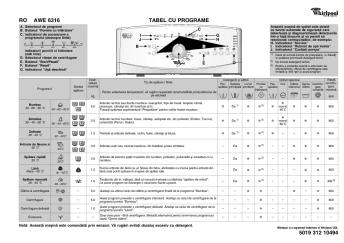
RO TABELUL CU PROGRAME 5019 301 06647
20/03/2015 - docs.whirlpool.eu
A. TABELUL CU PROGRAME C Indicatorul U_ deschis  Aceast ma_in de splat este dotat cu funccii automate de siguranc care detecteaz _i diagnosticheaz defecciunile într-o faz timpurie _i v permit s reaccionaci corespunztor, de exemplu: L A } RO Selectorul de programe Butonul Start/Pauz  Butonul Temperatur  Butonul Centrifugare  (incl. Oprire cu apa în cuv ) I. Butonul Terminarea programului  J. Butonul Ajutor la dozare  K. Butonul Nivel...

Istruzioni per l'uso
20/03/2015 - docs.whirlpool.eu
ISTRUZIONI IMPORTANTI PER LA SICUREZZA IMPORTANZA DELLA SICUREZZA PER SÉ E PER GLI ALTRI Il presente manuale e l apparecchio stesso sono corredati da importanti messaggi relativi alla sicurezza, da leggere ed osservare sempre. Questo è il simbolo di pericolo, relativo alla sicurezza, il quale avverte dei potenziali rischi per l utilizzatore e per gli altri. Tutti i messaggi relativi alla sicurezza saranno preceduti dal simbolo di pericolo e dai seguenti termini: PERICOLO Indica una situazione...


Profils d'impression par application Présentation ... - TA Triumph-Adler
06/06/2018 - www.triumph-adler.fr
TAF16/0103 18/01/2016 Objet : Profils d impression par application Modèles : Ensemble de la gamme TA Triumph-Adler Présentation / positionnement Le pilote d impression universel KX Driver permet de créer des profils d impression par application. Exemples : Profils d impression pour MS Office Word, Excel, Power Point, Outlook ; Internet Explorer ; Adobe Reader ; Notepad ; autres programmes. Comment y accéder ? A partir du pilote d impression KX Driver, disponible pour l ensemble de...

PAPIERS POUR IMPRIMANTES JET D'ENCRE Classe ...
25/11/2014 - www.epson.fr
Sommaire & contacts Imprimantes & Multifonctions Jet d'encre Professionnelles Workforce Pro 4 Imprimantes Jet d'encre Professionnelles 5 Imprimantes & Multifonctions laser 6 Solutions de gestion de parc 14 Étiqueteuses LabelWorks 16 Imprimantes Matricielles à impact 18 Imprimantes & Multifonctions Jet d encre 20 Séries d encre 26 Papiers pour Jet d'encre 28 Imprimantes Arts graphiques 29 Papiers pour Arts graphiques 34 Scanners 36

Fiche Produit Selon le règlement délégué (UE) N° 65/2014 - Brandt
12/05/2017 - www.brandt.fr
Hotte à usage domestique - Fiche Produit Selon le règlement délégué (UE) N° 65/2014 Marque Référence commerciale Consommation d'Energie Annuelle (AEC hotte) BRANDT AD1049B 125 kWh/an Classe d'efficacité énergétique du modèle D Efficacité Fluidodynamique (FDE hotte) 17,9 Classe d'efficacité fluidodynamique Efficacité lumineuse du modèle (LE hotte) Classe d'efficacité lumineuse du modèle D 3 Lux/Watt Efficacité de filtration des graisses G 76 % Classe d'efficacité de...

OPERATION SPECIALE STIMULATION DES VENTES LG et ...
19/02/2012 - www.lg.com
Communique de presse Paris, le 15 juillet 2009 OPERATION SPECIALE STIMULATION DES VENTES LG et WONDERBOX Du 1 Juin au 11 Juillet 2009 Pour appuyer le lancement de son nouveau téléphone multimedia tactile, baptisé ARENA KM 900, LG, accompagné par l agence Betwin, a fait appel à Wonderbox afin de réaliser une opération spéciale de stimulation des ventes. Pour tout achat d un coffret ARENA KM 900, le client bénéficiait d un coffret Wonderbox « soirée casino » pour 5 ¬ supplémentaires. Soirée...

PC USB USB PC
PC USB USB PC
16/02/2012 - www.logitech.com
2 1 3 PC PC English Plug AC cable into USB connector. Plug AC adapter into outlet. English Español Español Conecte el cable CA al conector USB. Conecte el adaptador CA a la toma de alimentación. Español Français Mettez l ordinateur Français Branchez le cordon d alimentation électrique dans le connecteur USB. Branchez l adaptateur secteur dans la prise électrique. Français Insérez les piles fournies dans la souris. English computer. Turn OFF Apague el ordenador. hors...

HXC-100 Brochure (3.2 MB) - Sony
16/02/2012 - www.sony.fr
HXC-100 HD/SD System Camera HXCU-100 Camera Control Unit Opening a New World of HD Production Over the years, Sony's standard-definition (SD) and high-definition (HD) production cameras have been widely accepted by a great number of video professionals around the world, due to their excellent picture performance and system versatility. Sony is now proud to introduce the new HXC-100 HD/SD System Camera equipped with newly developed digital triax technology, which allows systems to be configured...