Kuvaus 5019 396 03631

Extrait du fichier (au format texte) :

Kuvaus

Pikaopas

LUE TÄMÄ PIKAOPAS JA ASENNUSOHJEET HUOLELLISESTI ENNEN KONEEN
ENSIMMÄISTÄ KÄYTTÖÄ!

(katso oikealla olevia lisätoimintojen kuvauksia)
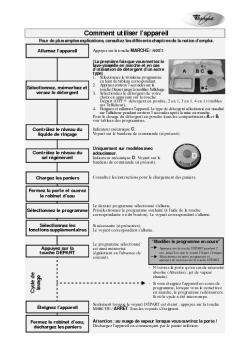
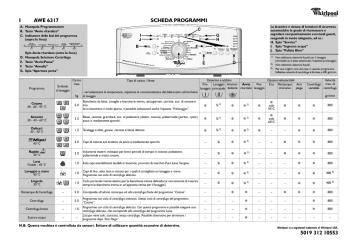
OHJELMAN VALINTAPAINIKE
Paina painiketta P (useamman kerran), kunnes näytössä näkyy valitun ohjelman numero (P1...Px)
- katso alla olevaa ohjelmataulukkoa.

KÄYNNISTYS-/JATKAMISPAINIKE
Tällä painikkeella käynnistetään valittu ohjelma:
merkkivalo syttyy, ja se sammuu ohjelman päätyttyä. Jos luukku avataan pesuohjelman aikana, jakso keskeytyy:
käynnistyksen merkkivalo vilkkuu. Voit jatkaa jaksoa painamalla käynnistyspainiketta ja sulkemalla luukun 3
sekunnin kuluessa.

PERUUTUS-/PYSÄYTYSPAINIKE
Tämän painikkeen painaminen kytkee käyttöpaneelin pois toiminnasta.
Jos painiketta painetaan pesuohjelman aikana, kone peruuttaa käynnissä olevan ohjelman tyhjentäen vettä 1
minuutin ajan (näytössä näkyy 0:01).
Jos painiketta painetaan astianpesukoneen ollessa pois toiminnasta, kone tyhjentää koneeseen mahdollisesti jääneen nesteen (toiminto kestää minuutin).

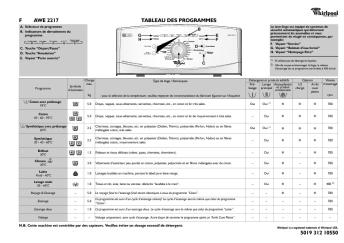
Ohjelmataulukko

Anturi

P2

Esipesu

kylmä

Ajastus

P3

Pika

45 °C

Les promotions


pobierz (2.6 MB) - VideoTesty.pl
20/03/2015 - docs.whirlpool.eu
1) Informacje dotyczce bezpieczeDstwa .........1 2) Utylizacja.......................................................2 3) Instrukcja obsBugi Panel sterowania.. .. ... ... .... ... ....... ... ... .... ...... ... . ...3 Opis zmywarki. .. ... .. ... .. ... .. ... .. ... .. ... & &... ... . . ..3 Przeczyta instrukcj Drogi Kliencie, Prosimy o uwa|ne przeczytanie niniejszej Instrukcji ObsBugi oraz zachowanie jej na przyszBo[. Prosimy o przekazanie Instrukcji kolejnemu u|ytkownikowi...

AKT 310 - whirlpool documents
20/03/2015 - docs.whirlpool.eu
AKT 310 DE AT BE GB FR NL ES PT IT GR SE NO DK FI PL CZ SK HU RU BG RO 1. Rapid Cast Iron Plate Ø 145 3. Power indicator lights 4. Cooking zone control knob 5. PROTECTING THE ENVIRONMENT Disposal of packaging Rapid Cast Iron Plate Ø 180 2. HOTPLATE OPERATION INSTRUCTIONS Cooking zone control knob " " The packaging material is entirely recyclable, and is marked with the recycling symbol . Do not dispose of the various packaging materials carelessly, but do so responsibly and in...

ENERGY LABEL
ENERGY LABEL
20/03/2015 - docs.whirlpool.eu
WHIRLPOOL WP 207 A A A A A A A 234 2800 ABCDEFG 2010/1059 X13 44

FONTOS BIZTONSÁGI TUDNIVALÓK
20/03/2015 - docs.whirlpool.eu
FONTOS BIZTONSÁGI TUDNIVALÓK AZ ÖN ÉS MÁSOK BIZTONSÁGA RENDKÍVÜL FONTOS Ez a kézikönyv és maga a készülék fontos biztonsági figyelmeztetéseket nyújt, amelyeket el kell olvasni és mindenkor figyelembe kell venni. Ez a veszély szimbólum a biztonságra vonatkozóan, amely figyelmezteti a felhasználókat az Qket és másokat fenyegetQ lehetséges kockázatokra. Minden biztonsági figyelmeztetést megelQz a veszély szimbólum és a következQ kifejezések egyike: VESZÉLY! Veszélyes...

Bedienungsanleitungen
20/03/2015 - docs.whirlpool.eu
INHALT KURZANLEITUNG PROGRAMMTAFEL VORBEREITEN DER WÄSCHE AUSWAHL DES PROGRAMMS UND DER ZUSATZFUNKTIONEN STARTEN UND AUSFÜHREN EINES PROGRAMMS WECHSELN EINES PROGRAMMS UNTERBRECHEN EINES PROGRAMMS TÄGLICHE WARTUNG UND REINIGUNG BEDIENUNGSANLEITUNGEN HEFT SICHERHEITSHINWEISE FÜR DIE INBETRIEBNAHME / ANSCHLÜSSE SEITE 4 SICHERHEITSHINWEISE UND ALLGEMEINE EMPFEHLUNGEN SEITE 5 BESCHREIBUNG DES TROCKNERS SEITE 6 HINWEIS - WARTUNG UND REINIGUNG ANSCHLUSS DES ABLUFTSCHLAUCHS SEITE WECHSELN...

EINBAUANLEITUNG KOCHFELD MAßE DER KOCH- UND ...
20/03/2015 - docs.whirlpool.eu
EINBAUANLEITUNG KOCHFELD AKT 100 DE 1. 2. Strahlungskochzone Ø 210 3. Strahlungskochzone Ø 145 4. 3 2 Strahlungskochzone Ø 145 Strahlungskochzone Ø 180 4 1 Betrieb der kochzonen Die einstellknöpfe des kochfeldes befinden sich auf dem bedienfeld des herdes. " Stellen Sie den Bedienknopf auf eine der Positionen 1 bis 6, die unterschiedlichen Temperaturen entsprechen. " Zum Ausschalten der Kochzonen stellen Sie den Einstellknopf auf "0. Wichtig: Zur Vermeidung von dauerhaften Beschädigungen...

5KMT221 5KMT421 - whirlpool documents
20/03/2015 - docs.whirlpool.eu
5KMT221 5KMT421 W10625929A_ENv03.indd 1 9/9/13 12:16 PM W10625929A_ENv03.indd 2 9/9/13 12:16 PM English................................................................................. 3 Deutsch............................................................................. 00 Français............................................................................. 00 Italiano............................................................................... 00 Nederlands..........................................................................

GUIDE RAPIDE
GUIDE RAPIDE
20/03/2015 - docs.whirlpool.eu
D A B E D F E G H I L M N C Ventilateur Le ventilateur est préréglé sur Activé. O O Q F P P Q G H I L M N A B GUIDECRAPIDE FR


Logi Dock Datasheet
Logi Dock Datasheet
28/03/2025 - www.logitech.com
DATASHEET LOGI DOCK Upgrade the remote working experience with Logi Dock, an all-in-one docking station with one-touch meeting controls and a built-in speakerphone. Certified for leading video conferencing platforms and easy to set up, Logi Dock connects everything in one tidy unit, replaces the need for extra peripherals, and eliminates a tangle of cables and wires. THE ULTIMATE DOCK FOR HYBRID WORKERS Logi Dock is an all-in-one docking station with meeting controls and enterprise-quality audio...

QuickView Data Sheet - Seagate
24/10/2017 - www.seagate.com
DIGITAL ENTERTAINMENT FEATURES " Up to 300 hours of video recording " Quiet drive technology " MHX!" cache for high definition streaming performance " Advanced thermal monitoring " Shock protection system " Standard ATA7-T13 streaming commands CE HARD DRIVES 40GB  300GB Maxtor QuickView hard drives ® DESIGNED FOR are designed for digital video recorders (DVR), set-top boxes (STB), " DVD/HDD recorders DVD/HDD combos, game consoles and other consumer electronic devices. ...

Utilisation des dispositifs Bluetooth avec le hub Logitech sans fil
16/02/2012 - www.logitech.com
Utilisation des dispositifs Bluetooth avec le hub Logitech sans fil © 2003 Logitech, Inc. Utilisation des dispositifs Bluetooth avec le hub Logitech sans fil Sommaire Introduction 3 Présentation du guide 4 Quels périphériques Bluetooth sont disponibles? 6 Téléphones mobiles 6 PDA 7 Casques-micro 8 Imprimantes 9 Qu'est-ce qu'une pile Bluetooth? 10 Comment connecter les dispositifs? 12 Détection des dispositifs 12 Couplage des dispositifs 13 Sélection des services à utiliser 14 Connexion...

iMac G5 - Support - Apple
27/11/2014 - manuals.info.apple.com
iMac G5 Ventole superiori, 20" Istruzioni per la sostituzione Attenersi rigorosamente alle istruzioni contenute nel presente documento. Il mancato rispetto delle procedure indicate può causare danni alle apparecchiature e invalidare la garanzia del prodotto. Nota: Le istruzioni online sono disponibili all indirizzo http://www.apple.com/support/doityourself/. Utensili necessari " Utilizzare l'utensile fornito; cacciavite Phillips #2 o Torx-8 a seconda del tipo di viti presenti. Nota: Le viti...

Setting Up Your Computer - Support - Apple
27/11/2014 - manuals.info.apple.com
C H A P T E R 1 Setting Up Your Computer The illustration on the next page shows all the equipment you need to set up your computer and begin using it. ( Your monitor and keyboard may look slightly different.) Before following the setup instructions in this chapter, Apple suggests that you read Arranging Your Office  in the appendix for tips on adjusting your work furniture so that you re comfortable when using the computer. 1 Monitor Power Macintosh computer Keyboard cable (sometimes...

UP-20 UP-21MD UP-D23MD - Sony
17/11/2014 - www.sony.fr
UP-20 UP-21MD UP-D23MD Alors que des applications médicales telles que l endoscopie et les ultrasons requièrent des équipements toujours plus petits, les imprimantes utilisées avec de tels équipements doivent elles aussi devenir compactes. Les imprimantes UP-20, UP-21MD et UP-D23MD ont été conçues pour des applications médicales où il est nécessaire d obtenir rapidement des impressions de grande qualité, dans un espace restreint. Imprimantes vidéo couleur analogiques / numériques Les...