Oversikt 5019 396 03693

Extrait du fichier (au format texte) :

Oversikt

Hurtigreferanse

LES DENNE HURTIGREFERANSEN OG MONTERINGSVEILEDNINGEN FØR DU
BRUKER MASKINEN FOR FØRSTE GANG!
BETJENINGSPANELET PÅ DENNE OPPVASKMASKINEN AKTIVERES VED Å
TRYKKE PÅ HVILKEN SOM HELST KNAPP UNNTATT SLETTE-/AV-KNAPPEN.
FOR Å SPARE STRØM DEAKTIVERES BETJENINGSPANELET AUTOMATISK
ETTER 30 SEKUNDER HVIS INGEN SYKLUS ER STARTET.

Beskrivelse av tilleggsvalg og display

(se til høyre for beskrivelse av tilleggsvalg)
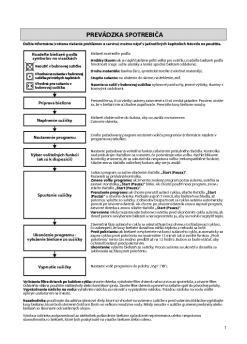
PROGRAMVALGKNAPP
Trykk på knappen «Program»
(gjentatte ganger) til tilsvarende programindikator lyser (se «Programtabellen»
under).

START/GJENOPPTA-KNAPP
Trykk på denne knappen for å starte programmet som er valgt: Indikatoren tennes og slukker når programmet er ferdig. Dersom døren åpnes under et program, settes syklusen på pause: Indikatoren for Start blinker. For å
gjenoppta syklusen lukker du døren og trykker på startknappen igjen.

SLETTE-/AV-KNAPP
Trykk på denne knappen for å slå av betjeningspanelet.
Dersom du trykker på knappen når et program pågår,
slettes programmet og vannet pumpes ut i 1 minutt.
Dersom du trykker på knappen når oppvaskmaskinen er slått av, pumpes eventuelle væsker ut av oppvaskmaskinen (prosessen tar 1 minutt).
Dersom indikatoren blinker gjentatte ganger,
se side 6 - kapittel «Hva må gjøres hvis ...».

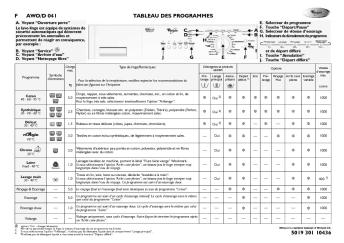
Programtabell
Tilgjengelige funksjoner

Forbruk
Instrukser for plassering av servise

P

Les promotions

Promo
14.9 € 12.9 €


????? ?? ?????????
????? ?? ?????????
20/03/2015 - docs.whirlpool.eu
 "  " BG $#&/ ECO GREEN ( ) (2 AJ>B25BAB285 A 45;0) "078 DC=:F8O >A83C@O20 =09-4>1@> AJE@0=5=85 =0 E@0=0B0 A 2J76=> =09-=AC 10% ?>-, 2 A@02=5=85 A =>@9:8), 0:> 8- :>;8G5AB2> E@0=0 70 AJE@0=5=85 2 C@540. 09-4>1@8B5 CA;>28O 70 AJE@0=5=85 =0 E@0=0B0, :>30B> 5 0:B828@0=0...

• AKR 891.indd
• AKR 891.indd
20/03/2015 - docs.whirlpool.eu
AKR 891 SADRÆAJ VA}NE NAPOMENE O SIGURNOSTI 2 POSTAVLJANJE 3 OPÊENITE PREPORUKE 3 U SLU»AJU PROBLEMA 4 SERVIS 4 »I`”ENJE 4 ISPORU»ENI PRIBOR 6 POSTAVLJANJE - UPUTE ZA SASTAVLJANJE 6 VELI»INA ZA POSTAVLJANJE 6 POSTAVLJANJE - SASTAVLJANJE 7 UPORABA NAPE 9 ODR}AVANJE 11

FIG. 1
FIG. 1
20/03/2015 - docs.whirlpool.eu
Nur für die 56 cm breite Ausführung For 56 cm wide version only Seulement pour la version de 56 cm Uitsluitend voor de brede uitvoering 56 cm Sólo para versión de 56 cm Apenas para a versão com 56 cm de largura Solamente per versione larga 56 cm ) . 2  Œ2 #"FP Endast för modell med bredd 56 cm Gjelder kun for versjon med bredde på 56 cm Kun for versionen med en bredde på 56 cm Vain malli, jonka leveys on 56 cm FIG. 1 5019 318 33227 FIG. 2 5019 318 33227 GR ü+ ù ù ùþ...

definition of use before using the washing machine
20/03/2015 - docs.whirlpool.eu
30106390GB.fm Page 1 Tuesday, February 22, 2011 2:56 PM DEFINITION OF USE This washing machine is exclusively destined to wash and spin machine washable laundry in quantities which are usual for private households. " Observe the instructions given in these Instructions for Use, the Installation Guide and the Programme Chart when using the washing machine. " Keep these Instructions for Use, the Programme Chart and the Installation Guide; if you pass on the washing machine to another person, also...

NOTICE D'EMPLOI - Boulanger
20/03/2015 - docs.whirlpool.eu
31055022F.fm Page 3 Monday, July 31, 2006 6:10 PM NOTICE D EMPLOI INSTALLATION ..................................4 CONSEILS POUR LA PROTECTION DE L ENVIRONNEMENT................................ 7 RECOMMANDATIONS .................................. 7 AVANT D UTILISER LE FOUR POUR LA PREMIÈRE FOIS......................................... 8 ACCESSOIRES DU FOUR............................... 9 ENTRETIEN ET NETTOYAGE...................... 10 DIAGNOSTIC DES PANNES........................ 14 SERVICE...

ENERGY LABEL
ENERGY LABEL
20/03/2015 - docs.whirlpool.eu
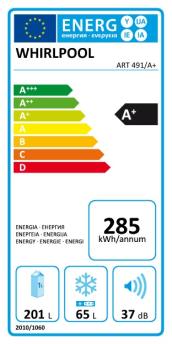
WHIRLPOOL ART 470/A+ 293 201 L 2010/1060 72 L 35 dB

MODE D'EMPLOI
MODE D'EMPLOI
20/03/2015 - docs.whirlpool.eu
MODE D EMPLOI AVANT D UTILISER L APPAREIL " L appareil que vous venez d acquérir est un combiné réfrigérateur et congélateur. Il est exclusivement réservé à un usage ménager. Pour utiliser au mieux votre appareil, nous vous invitons à lire attentivement les instructions relatives à son utilisation ; vous y trouverez la description de votre appareil et des conseils utiles pour la conservation des aliments. Conservez cette notice d emploi pour toute consultation ultérieure. 1. Après...

FONCTIONNEMENT DU SÈCHE-LINGE
20/03/2015 - docs.whirlpool.eu
FONCTIONNEMENT DU SÈCHE-LINGE Pour plus d'informations (y compris des informations relatives au dépannage et à l'entretien), consultez le manuel d'utilisation. Trier le linge en fonction des symboles d'entretien Pas de séchage en tambour Séchage en tambour possibleà températures réduites Séchage en tambour autorisé Sélection du linge Triez en fonction : De l'épaisseur du linge : si la quantité de linge à sécher est supérieure à la capacité du sèche-linge, séparez les pièces...


WD Green SSD Spec Sheet - Western Digital
28/03/2018 - www.wdc.com
WD Green SSD !" (Solid State Drive) Que vous utilisiez un ordinateur portable ou de bureau, les disques WD Green SSD offrent la performance et la fiabilité nécessaires pour améliorer la productivité de vos tâches quotidiennes. Bénéficiant de la certification complète F.I.T. Lab!" WD et disponibles dans un boîtier de 2,5 /7 mm ou au format M.2 2280, les WD Green SSD sont compatibles avec la plupart des PC. Le tableau de bord WD SSD gratuit vous permet de surveiller votre stockage....

imagine a monitor big enough to enhance your every move ...
21/11/2014 - www.samsung.com
24" Widescreen Analog/Digital LCD Monitor " Sharp 1920 x 1200 resolution 245BW " Fast 5ms response time " 3,000:1 Dynamic Contrast ratio (1,000:1 typical) " 16:10 widescreen aspect ratio " 160°/160° horizontal/vertical viewing angles " Exclusive image-enhancing Magic technologies " Ergonomic height-adjustable stand imagine a monitor big enough to enhance your every move. The 24" Samsung 245BW combines the expanse of a 16:10 widescreen aspect ratio with a 3,000:1 Dynamic Contrast ratio,...

Mode d'emploi - Hotpoint
11/07/2017 - www.hotpoint.fr
Mode d’emploi CUISINIERE FR Français, 1 FR Sommaire Installation, 2-5 Positionnement et nivellement Raccordement électrique Raccordement gaz Adaptation aux différents types de gaz Données techniques Tableau Caractéristiques des brûleurs et des injecteurs Description de l’appareil, Vue d’ensemble Tableau de bord 6 Mise en marche et utilisation, 7-9 C 35 G1 F /HA Utilisation du plan de cuisson Utilisation du four Tableau de cuisson Précautions et conseils, 10 Sécurité générale Mise...

C505e Datasheet
C505e Datasheet
12/09/2024 - www.logitech.com
FICHE TECHNIQUE WEBCAM HD C505E Passez au niveau sup?rieur apr?s avoir utilis? l'optique int?gr?e ? votre ordinateur gr?ce ? la webcam professionnelle Logitech? C505e offrant une vid?o HD 720p grand angle nette, fluide et color?e ? un prix abordable qui vous facilitera la vie au bureau. La webcam C505e offre un champ de vision diagonal ? 60?, une mise au point fixe et une correction automatique de l'?clairage, qui ajuste l'illumination de la plupart des espaces. Un micro omnidirectionnel offre...

PEARL KESHI Leaflet Web
28/06/2024 - www.cabasse.com
2.1 HiFi System UN RAPPORT COMPACITÉ/PERFORMANCES ACOUSTIQUES INÉGALÉS UNRIVALLED SIZE/ACOUSTIC PERFORMANCE RATIO ULTRA MINIATURISATION ULTRA MINIATURIZATION Un système connecté 2.1 minimaliste avec 2 satellites de diamètre 8 cm et d'un caisson de 22 cm qui peut trouver sa place facilement sans encombrer. A minimalist 2.1 connected system with 2 x 8cm Ø satellites and a 22 cm woofer that can be placed anywhere without taking up too much space. Avec ce système audio, vos visiteurs...

WiFi (WLAN) - Audentia
11/05/2020 - www.archos.com
English Table of contents Package contents........................................................................................................................2 Getting started.............................................................................................................................3 Description of the device..........................................................................................................4 Through the wizard....................................................................................................................6 Connecting...