Tableau

Extrait du fichier (au format texte) :

Tableau

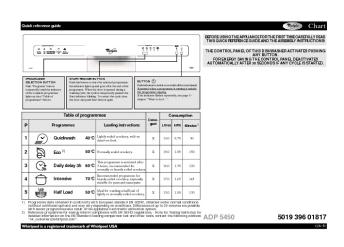
Guide de consultation rapide

AVANT D'UTILISER L'APPAREIL POUR LA PREMIERE FOIS, LISEZ ATTENTIVEMENT CE GUIDE DE CONSULTATION RAPIDE ET LES INSTRUCTIONS D'INSTALLATION !
POUR ACTIVER LE BANDEAU DE COMMANDE DE CE LAVE-VAISSELLE, IL SUFFIT D'APPUYER SUR UNE TOUCHE QUELCONQUE, A L'EXCEPTION DE LA TOUCHE
ANNULATION/ARRET.
POUR REDUIRE LA CONSOMMATION D'ENERGIE, LE BANDEAU DE COMMANDE S'ETEINT AUTOMATIQUEMENT AU BOUT DE 30 SECONDES SI AUCUN CYCLE N'A ETE
DEMARRE.
INDICATEUR DE
FONCTIONNEMENT

Un voyant projeté sur le sol signale le fonctionnement du lave-vaisselle.

SELECTEUR DE
PROGRAMME

Appuyez (plusieurs fois) sur la touche « P », jusqu'à ce que le numéro du programme sélectionné
s'affiche à l'écran (P1...Px) voir le « Tableau des programmes » à la page suivante.

AFFICHAGE DE LA DUREE DU LAVAGE

Indique la durée du cycle et le temps restant (h:min). Si l'option « Départ différé » est sélectionnée, l'affichage indique le temps restant avant le démarrage du programme (h.00) - au-dessous de 1 h (0:min).
Si « Fx Ey » s'affiche, consultez le chapitre « Que faire si... », à la page 9.

POWERCLEAN®

Grâce à l'intensité accrue des jets d'eau, cette option garantit un lavage plus en profondeur de la zone spécifique, dans le panier inférieur.
Elle est recommandée pour le lavage des cocottes et des casseroles (voir page 7).
Appuyez sur cette touche pour activer l'option
PowerClean® (le voyant s'allume).
Pour assurer des


Les promotions


Comment utiliser l'appareil
20/03/2015 - docs.whirlpool.eu
Comment utiliser l appareil Pour de plus amples explications, consultez les différents chapitres de la notice d emploi. Allumez l appareil Sélectionnez, mémorisez et versez le détergent Appuyez sur la touche MARCHE / ARRÊT. (La première fois que vous mettez le lave-vaisselle en marche et en cas d utilisation de détergent d un autre A BC type) 1. Sélectionnez le troisième programme en haut du tableau correspondant. 2. Appuyez environ 7 secondes sur la touche Départ jusqu à modifier...

HR TABLICA PROGRAMA 5019 301 06646
20/03/2015 - docs.whirlpool.eu
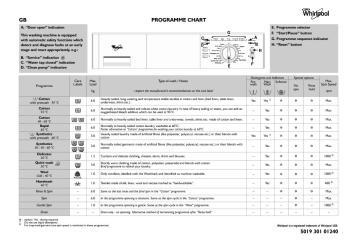
HR Pokazatelj Vrata otvorena  Pokazatelj Pranje u tijeku  Pokazatelj Program je zavraen  D/E/F/G B C T A S L Perilica rublja ima automatske sigurnosne funkcije koje otkrivaju i dijagnosticiraju kvarove u ranoj fazi te reagiraju na odgovarajui na in, npr.: H Maks. kol. Etikete za rublja odr~avanje kg I } Program Temperatura Programator Tipka Start/Pauza  Tipka Temperatura  Tipka Centrifuga  (uklju ujui i Zaustavljanje ispiranja  ) L. Eko monitor M. Tipka Pomo pri...

BLZH 4006 PRODUKTANGABENBLATT
20/03/2015 - docs.whirlpool.eu
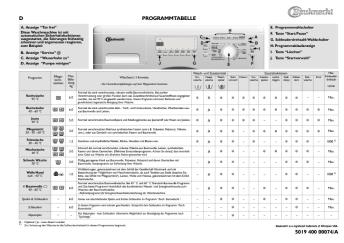
BLZH 4006 PRODUKTANGABENBLATT DE AT Obere... Untere Einschubebene 1. Bedienfeld 2. Kühlgebläse* (nicht sichtbar) 3. Oberes Heizelement (zum Herunterklappen) 4. Rundes Heizelement (nicht sichtbar) 5. Gebläse 6. Unteres Heizelement (nicht sichtbar) 7. Seitliche Halogenlampen 8. Türscharniere 9. Kühle Backofentür *Anmerkung: Das Kühlgebläse beginnt erst dann zu laufen, wenn der Backofen eine bestimmte Temperatur erreicht hat. Das Kühlgebläse kann auch nach dem Ausschalten des Backofens...

ENERGY LABEL
ENERGY LABEL
20/03/2015 - docs.whirlpool.eu
WHIRLPOOL ART 6710 GK 235 195 L 2010/1060 80 L 35 dB

ENERGY LABEL
ENERGY LABEL
20/03/2015 - docs.whirlpool.eu
WHIRLPOOL ART 9811/A++ SF 247 228 L 2010/1060 80 L 35 dB

Scarica
Scarica
20/03/2015 - docs.whirlpool.eu
MWD 321 MWD 322 =AB@C:FVO 7 5:A?;C0B0FVW www.whirlpool.com INSTALLAZIONE PRIMA DI EFFETTUARE IL COLLEGAMENTO ALLA RETE ELETTRICA Installare il forno lontano da fonti di calore. Per consentire una ventilazione sufficiente, lasciare sopra il forno uno spazio di almeno 30 cm. Il microonde non deve essere collocato all'interno di un mobile. Questo forno non è progettato per essere disposto o utilizzato su una superficie di lavoro ad altezza inferiore a 850 mm dal pavimento. Controllare...

501932602055GB.qxp:Layout 1 - whirlpool documents
20/03/2015 - docs.whirlpool.eu
BEFORE USING THE APPLIANCE To make the most out of your new appliance, please read the user instructions carefully and keep them handy for future consultation. SAFETY PRECAUTIONS " Never block the air inlet or outlet of indoor and outdoor unit. " Physically or mentally disabled people, children and people without any experience with the product are only allowed to use the appliance if they have had specific training on how to operate the appliance by a person responsible for their security and...

KÄYTTÖOHJE
KÄYTTÖOHJE
20/03/2015 - docs.whirlpool.eu
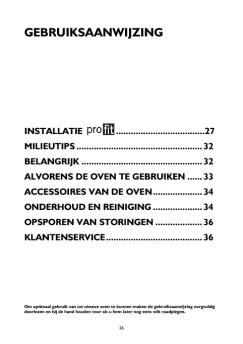
31902044FIN.fm Page 25 Friday, April 11, 2008 5:31 PM KÄYTTÖOHJE ENNEN KERAAMISEN LIEDEN KÄYTTÖÖNOTTOA ASENNUS SÄHKÖLIITÄNTÄ ENERGIANSÄÄSTÖVINKKEJÄ YMPÄRISTÖNSUOJELU VAROTOIMIA JA YLEISIÄ SUOSITUKSIA LIEDEN VARUSTEET KERAAMISEN LIEDEN PUHDISTUS JA HUOLTO VIANETSINTÄ HUOLTOPALVELU 25 31902044FIN.fm Page 26 Friday, April 11, 2008 5:31 PM ENNEN KERAAMISEN LIEDEN KÄYTTÖÖNOTTOA " Jotta saisit uudesta laitteestasi parhaan mahdollisen hyödyn, on tärkeää että luet käyttöohjeet...


EULA - Seagate
EULA - Seagate
14/04/2017 - www.seagate.com
CONTRAT DE LICENCE DE L UTILISATEUR FINAL D UN LOGICIEL SEAGATE VEUILLEZ LIRE ATTENTIVEMENT LE PRESENT CONTRAT DE LICENCE DE L UTILISATEUR FINAL (LE « CLUF »). VOUS ET VOTRE ENTREPRISE ACCEPTEZ LA TOTALITE DES MODALITES DU PRESENT CLUF SI VOUS CLIQUEZ SUR LE BOUTON « J ACCEPTE » OU PRENEZ DES MESURES EN VUE DE TELECHARGER, D INSTALLER OU D UTILISER L ENSEMBLE OU UNE PARTIE DU PRESENT PRODUIT (NOTAMMENT LE LOGICIEL ET LES FICHIERS CONNEXES, Y COMPRIS LE LOGICIEL ET LES FICHIERS PERMETTANT...

SATISFAIT ou REMBOURSÉ - Brother
22/05/2018 - www.brother.fr
Du 15 août au 30 novembre 2015 BIEN PLUS EFFICACE QU UN STYLO ! SATISFAIT REMBOURSÉ * ou SIMPLIFIEZ-VOUS LA VIE AVEC VOTRE IMPRIMANTE D ÉTIQUETTES ! *Voir conditions de l offre au dos QL-700 Du 15 août au 30 novembre 2015 SATISFAIT * ou REMBOURSÉ Si toutefois, vous n êtes pas satisfait de votre imprimante d étiquettes QL-700, il vous suffit de : 1- Remplir le formulaire ci-dessous (**champs obligatoire) Raison Sociale : .................................................................

Fiche produit Sony : 99/1202990776999.pdf
16/02/2012 - www.sony.fr
SNC-CS3P Camera Vidéo Professionnelle pour Réseau Caméra professionnelle et compacte idéale pour les applications de vidéosurveillance et de contrôle à distance grâce à une qualité d'image exceptionnelle. La nouvelle caméra réseau couleur SNC-CS3P de Sony est parfaitement adaptée aux applications de surveillance et de web-casting. Conçue pour répondre à la demande en matière de caméra réseau de haute qualité à un prix abordable, la SNC-CS3P garantit des performances de grande...

WD Sentinel™ DX4000 Small Office Storage Server - Product ...
11/04/2012 - www.wdc.com
WD Sentinel DX4000 Connecter. Protéger. Collaborer. TM Serveur de stockage pour PME Installation facile. Facile à gérer. Protection de données complète. Accès à distance intégré sécurisé. WD Sentinel est facile à installer et fournit une solution de stockage sécurisée et centralisée, une protection de données complète et un accès aux données pour vos employés, clients ou partenaires, depuis vos bureaux ou à l'extérieur. Grâce à une technologie matérielle et logicielle...

AppleCare Protection Plan for iPad - Support
27/11/2014 - manuals.info.apple.com
AppleCare Protection Plan for iPad Getting Started Guide Contents 5 English 39 Français 59 Deutsch 81 Español 99 Italiano 117 Svenska 133 Suomi 151 Dansk 167 Nederlands 185 Norsk 201 Português AppleCare Protection Plan for iPad Fact Sheet Service and support from the people who know your iPad best The AppleCare Protection Plan for iPad extends the complimentary coverage on your iPad to up to two years1 of world-class support. The plan provides access to iPad experts...

Guide de démarrage (PDF) - Logitech
05/12/2014 - www.logitech.com
Thank you! Grazie! Merci! Mange tak! Takk! Hartelijk dank! PULL Obrigado! Kiitos! AAA Wireless Presenter R400 Te_ekkürler! USB Logitech® Quick start guide Features English Dansk Português 1 Functies 1. Laseraanwijzer 2. Naar volgende en vorige dia gaan 3. Zwart scherm (bij sommige toepassingen) 4. Diavoorstelling starten Funktioner 1. Laserpegepind 2. Næste/forrige dias 3. Sort skærm (i nogle programmer) 4. Start diasshow Características 1. Apontador laser